Raspberry Pi Self-Hosting in 2026: What You Can (and Can’t) Actually Run
Raspberry Pi self-hosting in 2026: what a Pi 5 can actually run, what it can't, real power and cost numbers, and when a mini PC is the smarter buy.
⚡ The Honest Answer
A Raspberry Pi is a fantastic self-hosting starter — tiny, near-silent, and just 5-12 watts of power. But it has real limits. Raspberry Pi self-hosting shines for lightweight always-on services like Pi-hole, a VPN, and a password manager. It struggles with storage-heavy or AI-heavy apps. And once you add a case, SSD, and power supply, you’re near mini-PC pricing — so the Pi is the right pick for specific reasons, not by default. This guide is the honest breakdown.
The Raspberry Pi gets recommended as a universal home server, but that advice is half-right at best. Raspberry Pi self-hosting is genuinely excellent for the right workloads and frustrating for the wrong ones. This guide gives you the honest version: what a Pi 5 runs beautifully, what overwhelms it, the true all-in cost, and when you should buy a mini PC instead.
Why Use a Raspberry Pi for Self-Hosting?
The Pi earns its reputation for good reasons — these are real advantages no mini PC fully matches:
- Tiny power draw. A Pi 5 sips 5-12 watts under typical server load. Running 24/7 at the US average of 18.34¢/kWh, that is roughly $8-19 a year — under two dollars a month.
- Low entry price. The board starts around $80 (4 GB) to $125 (8 GB) in 2026. (RAM price rises have pushed these up from previous years.)
- Silent and tiny. Credit-card sized, fanless options, fits anywhere. No noise, no heat to speak of.
- A genuine learning platform. The huge community, endless tutorials, and ARM Linux experience make it the best place to learn self-hosting hands-on.
If you’re brand new to all this, start with what is self-hosting first, then come back to choose hardware.
What a Raspberry Pi Runs Well
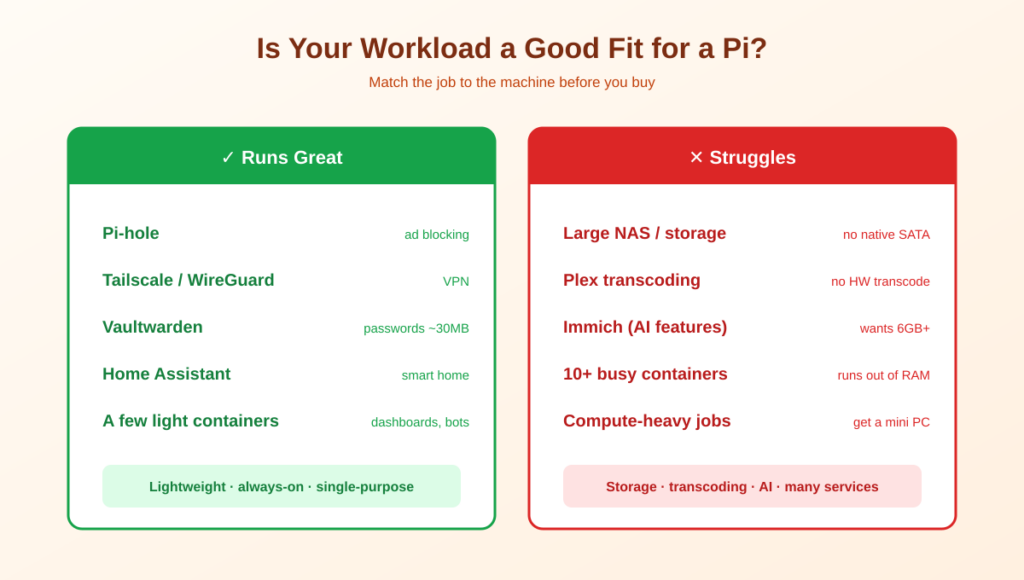
The Pi 5 (especially the 8 GB model) handles lightweight, always-on services without breaking a sweat. These are its sweet spot:
- Pi-hole. Network-wide ad and tracker blocking. The classic Pi project — barely uses any resources and benefits your whole home.
- VPN (Tailscale or WireGuard). Secure remote access to your home network. Tiny footprint, perfect Pi job.
- Vaultwarden. A full password manager in ~30 MB of RAM — runs comfortably on a Pi.
- Home Assistant. Smart-home automation hub; the Pi is one of the most common platforms for it.
- A few light Docker containers. Small web apps, dashboards, bots, a personal wiki — a handful at once is fine.
Two of these have full guides: Tailscale and Vaultwarden — both ideal first Pi projects.
What a Raspberry Pi Struggles With
Here’s the honesty most Pi articles skip. These workloads will frustrate you on a Pi:
- Large media storage / NAS. The Pi has no native SATA and limited I/O. You can bolt on USB drives, but for a serious multi-terabyte library, a real NAS or mini PC is far better.
- Plex/Jellyfin with transcoding. The Pi can stream direct-play files, but it has no proper hardware transcoding for multiple or high-bitrate streams. Heavy media serving is not its strength.
- Immich and other AI-heavy apps. Immich’s machine-learning features want 6 GB+ of RAM and real CPU. It technically runs on a Pi but will feel sluggish on a large library.
- Many containers at once. Run ten busy services and the Pi runs out of headroom. It’s a ‘a few light things’ machine, not a ‘host my entire stack’ machine.
For those heavier jobs, see the best NAS for Plex and best mini PC guides.
The True Cost: Pi vs Mini PC
The Pi’s $80 sticker price is real, but it’s not the whole story. A working server needs more than the bare board. Here’s the honest all-in cost for a Pi 5 setup versus where it lands you:
| Component | Typical cost |
|---|---|
| Raspberry Pi 5 (4 GB / 8 GB) | ~$80 / ~$125 |
| Official power supply | ~$12 |
| Case + cooling | ~$15 |
| NVMe SSD + HAT (or microSD) | ~$30-50 |
| All-in total | ~$137-202 |
⚠️ The pricing reality: At $137-202 all-in, a Pi 5 overlaps the bottom of the Intel N100 mini-PC range (from about $200) — and an N100 mini PC is faster, x86-compatible (no occasional ARM headaches), and uses similar power. The yearly electricity difference between them is small. So the Pi makes financial sense when you already own one, want a single-purpose device, or specifically want to learn ARM Linux — not automatically because it looks cheapest.
When to Choose a Raspberry Pi (and When Not To)
Choose a Raspberry Pi if: you want a dedicated single-purpose box (Pi-hole, Home Assistant, or a VPN), you already own one, you value absolute minimum power and silence, or learning ARM Linux is part of the goal.
Choose a mini PC instead if: you want to run many services at once, you need media transcoding or AI apps like Immich, you want maximum software compatibility (x86), or your all-in Pi build is already approaching $200 — at that point the N100 simply does more.
Choose a NAS if: your main goal is storing and serving large amounts of data (photos, media, backups) with drive redundancy.
Getting Started With Raspberry Pi Self-Hosting
If the Pi fits your use case, here’s the quick path to a solid setup:
- Use Raspberry Pi OS Lite (64-bit). No desktop environment means more RAM and CPU for your actual services. Flash it with the official Raspberry Pi Imager.
- Boot from an SSD, not microSD, if you can. The Pi 5’s PCIe slot allows an NVMe SSD via a HAT — far more reliable and faster than an SD card, which can wear out.
- Use the official power supply. Generic USB-C supplies often can’t sustain load spikes, causing random reboots that are miserable to diagnose. The few extra dollars are worth it.
- Install Docker, then add services one at a time. Start with one app, confirm it’s stable, then add the next — the same ‘grow gradually’ rule that applies to all self-hosting. What a compose file is actually doing is worth understanding before the second container.
Then lock it down with the server security guide — SSH keys and a firewall matter just as much on a Pi.
Frequently Asked Questions About Raspberry Pi Self-Hosting
Is a Raspberry Pi good for self-hosting?
Yes, for the right workloads. A Pi 5 is excellent for lightweight always-on services like Pi-hole, a VPN, Home Assistant, and a password manager, using just 5-12 watts. It’s less suited to storage-heavy, media-transcoding, or AI-heavy apps. Choose it for single-purpose, low-power use rather than as a do-everything server.
How much does it cost to run a Raspberry Pi 24/7?
Very little — a Pi 5 draws 5-12 watts, which works out to roughly $3-8 per month depending on your electricity rate, or often under $20 per year. It’s one of the cheapest devices you can leave running continuously.
What can I self-host on a Raspberry Pi?
Great fits include Pi-hole (network ad blocking), Tailscale or WireGuard (VPN), Vaultwarden (password manager), Home Assistant (smart home), and a handful of lightweight Docker containers. Avoid using it as a large NAS, a heavy Plex transcoding server, or for AI-intensive apps like Immich on big libraries.
Is a Raspberry Pi or a mini PC better for a home server?
It depends on workload. A Pi wins on power draw, size, and silence for single-purpose tasks. A mini PC (like an Intel N100) wins on raw capability, x86 compatibility, and running many services at once. Since an all-in Pi 5 setup costs $130-150 — similar to an N100 mini PC — the mini PC is often the better general-purpose buy.
How much does a Raspberry Pi home server really cost?
The board is $80-125, but a working server also needs a power supply (~$12), case and cooling (~$15), and storage (~$30-50 for NVMe), bringing the all-in total to roughly $130-150. That’s worth knowing, because it puts the Pi in the same price range as more capable mini PCs.
Should I use an SD card or SSD for a Raspberry Pi server?
Use an SSD if you can. The Pi 5 supports NVMe SSDs via a PCIe HAT, which is far faster and much more reliable than a microSD card. SD cards can wear out under the constant writes of a 24/7 server, risking data loss. An SSD is the single best reliability upgrade.
Can a Raspberry Pi run Immich or Plex?
Technically yes, practically with caveats. Immich runs but its AI features want 6 GB+ RAM and real CPU, so it feels sluggish on large libraries. Plex/Jellyfin can direct-play files but the Pi lacks proper hardware transcoding for multiple or high-bitrate streams. For either, a mini PC or NAS is a much better experience.
The Bottom Line
🍓 Takeaway: Raspberry Pi self-hosting is brilliant for lightweight, always-on, single-purpose services — Pi-hole, a VPN, a password manager — at tiny power and noise. It’s the best place to learn. But it struggles with storage, transcoding, and AI workloads, and once you add the accessories it costs as much as a more capable mini PC. Pick a Pi for the right reasons, not because it looks cheapest — and if you already own one, start hosting today.
Compare the alternatives in the best mini PC and best NAS guides, or see what to run first in 10 self-hosted apps.
How This Guide Was Researched
- Raspberry Pi 5 pricing ($80-125 board, $130-150 all-in) verified across multiple 2026 hardware guides, reflecting the year’s RAM price increases
- Power consumption (5-12 watts under server load) cross-referenced across independent measurements
- Workload suitability (great for Pi-hole/VPN/Vaultwarden, weak for NAS/transcoding/Immich) reflects consistent findings across self-hosting hardware sources
- Pi-vs-mini-PC cost parity confirmed by multiple 2026 comparisons
Hardware and pricing change — check the official Raspberry Pi site for current models and prices.
Questions about your setup? Email hello@selfhostlife.com.
Product links on this site are plain links. We earn nothing from them — see our disclosure policy.