10 Self-Hosted Apps That Replace Expensive SaaS Subscriptions in 2026
10 self-hosted apps that replace expensive SaaS subscriptions in 2026 — Nextcloud, Immich, Vaultwarden and more. Cut your monthly bills and own your data.
⚡ The Big Idea
A common subscription stack runs about $44/month — cloud storage, password managers, note apps, photo backup — and the table further down adds it up. Almost every one has a free, self-hosted alternative you can run on a single $5 VPS or a home NAS. This guide covers the 10 best, what each replaces, and how much you save.
Self-hosting in 2026 is in great shape. Projects like Immich and Jellyfin have shipped mature, stable releases, and the gap between self-hosted apps and their paid SaaS equivalents has mostly closed. The tradeoff is honest: you swap a monthly fee for a bit of your time and attention (updates, backups, security).
Every app below meets three criteria: active development, an official Docker image, and a real SaaS product it can replace. Prices listed are SaaS prices as of 2026 — verify current pricing on each vendor’s site, since SaaS pricing changes often.
What You Need to Run These Apps
You don’t need 10 servers. Most of these apps are lightweight Docker containers, and a single modest machine runs a dozen of them comfortably. Most are also a single container rather than a stack — counting fifteen projects found seven install as one service. Your two main options:
A $5 VPS — rent a small cloud server (Hetzner, Vultr). Best for apps you want accessible from anywhere. See my step-by-step setup guide.
A home NAS — a Synology or UGREEN box that runs apps locally and stores your data at home. Best for media and large files.
Most apps below run on either. We’ll note when an app specifically prefers one or the other.
The 10 Best Self-Hosted Apps for 2026
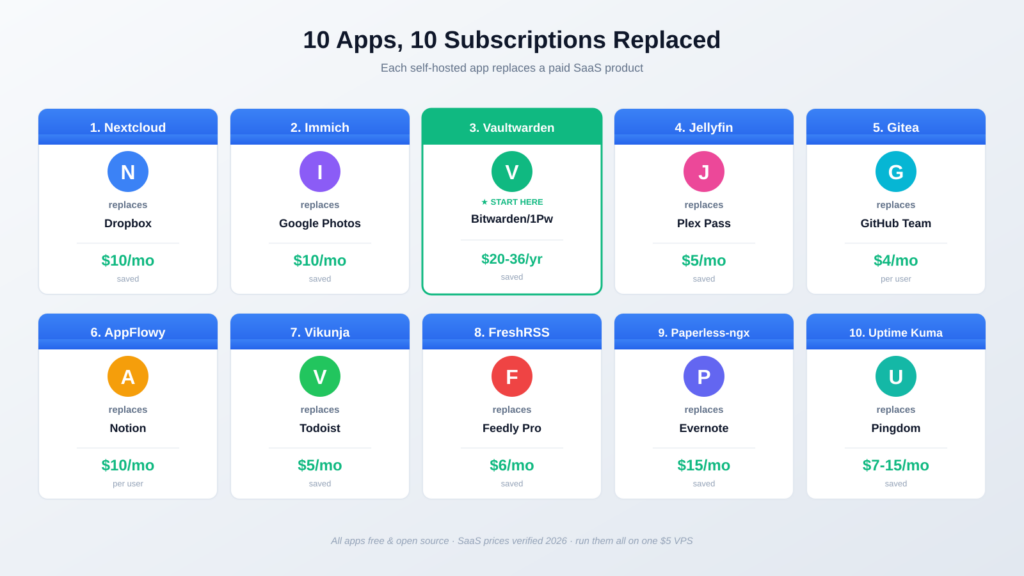
1. Nextcloud — replaces Dropbox / Google Drive · saves ~$10/mo
What it does: Nextcloud is the closest thing to a self-hosted Google Workspace. File sync and share, plus calendar, contacts, notes, and a collaborative office suite. It’s the flagship self-hosting app for a reason.
Replaces: Dropbox Plus ($9.99/mo for 2TB) or Google One. With your own storage, the only limit is your disk size.
Difficulty: Moderate. The all-in-one Docker image is beginner-friendly. Pairs perfectly with a NAS for large file storage.
2. Immich — replaces Google Photos · saves ~$2-10/mo
What it does: Immich is a self-hosted photo and video backup platform with a Google Photos-style interface — automatic phone backup, facial recognition, search, albums, and partner sharing. In 2026 it shipped its first stable releases and is now genuinely production-ready.
Replaces: Google Photos (via Google One, $1.99/mo for 100GB up to $9.99/mo for 2TB).
Difficulty: Moderate. Needs decent storage and benefits from hardware for the AI features. A NAS or a VPS with attached storage works well.
3. Vaultwarden — replaces Bitwarden Premium / 1Password · saves ~$20-36/yr ★ START HERE
What it does: Vaultwarden is a lightweight, self-hosted server compatible with all official Bitwarden apps and browser extensions. Your passwords live on your server, synced across every device.
Replaces: Bitwarden Premium (~$19.80/yr after the January 2026 price increase) or 1Password (~$36/yr). All premium features come free when self-hosted.
Difficulty: Easy. One of the lightest containers on this list — runs on the cheapest VPS. This is the perfect first self-hosted app.
I cover the exact Vaultwarden setup step-by-step in my $5 VPS self-hosting guide.
4. Jellyfin — replaces Plex Pass · saves ~$7/mo
What it does: Jellyfin is a fully free media server — your movies, shows, and music streamed to any device. It’s the fully open-source alternative to Plex, with no paywall and no required account.
Replaces: Plex Pass ($6.99/mo or $749.99 lifetime as of August 2026) and chips away at streaming subscriptions for content you own.
Difficulty: Moderate. Best on a NAS or mini PC with hardware transcoding.
Jellyfin and Plex both shine on the right hardware. See my best NAS for Plex guide — the same hardware advice applies to Jellyfin. When you are ready to install it, the Jellyfin setup guide covers the compose file, hardware transcoding and remote access. For a music library specifically, a dedicated server is the better fit: Navidrome runs as one container and works with any Subsonic client.
5. Gitea — replaces GitHub Team · saves ~$4/mo per user
What it does: Gitea is a lightweight, self-hosted Git service — like a private GitHub. Repositories, issues, pull requests, wikis, and CI, all on your own server. Installs from a single binary or a simple Docker container.
Replaces: GitHub Team ($4/mo per user) for private repos and collaboration features.
Difficulty: Easy. Famously lightweight — runs on almost nothing.
6. AppFlowy — replaces Notion · saves ~$10/mo per user
What it does: AppFlowy is an open-source Notion alternative — docs, wikis, databases, kanban boards, and notes. The interface will feel instantly familiar to any Notion user.
Replaces: Notion Plus ($10/mo per member, billed annually).
Difficulty: Moderate. The self-hosted AppFlowy Cloud uses a multi-service Docker Compose setup, so it needs a little more comfort than a single-container app.
7. Vikunja — replaces Todoist · saves ~$4-5/mo
What it does: Vikunja is a self-hosted to-do and task management app with lists, kanban boards, Gantt charts, and reminders. A clean, fast alternative for personal productivity.
Replaces: Todoist Pro (~$4-5/mo) or similar task managers.
Difficulty: Easy. Single container, very light. Good early self-hosting project.
8. FreshRSS — replaces Feedly Pro · saves ~$6/mo
What it does: FreshRSS is a self-hosted RSS feed aggregator — follow news sites, blogs, and YouTube channels in one clean reader, with no algorithm deciding what you see. Mobile apps connect via its API.
Replaces: Feedly Pro (~$6/mo) or other paid RSS readers.
Difficulty: Easy. Lightweight PHP app, runs anywhere. For the links you want to keep rather than read once, Karakeep self-hosted is the read-later half of the same job — and it can store a local copy of the page, once you know the setting that ships switched off.
9. Paperless-ngx — replaces Evernote / DocuWare · saves ~$15/mo+
What it does: Paperless-ngx is a self-hosted document management system. Scan or upload documents, and it OCRs them, tags them, and makes everything full-text searchable. Your filing cabinet, digitized and private.
Replaces: Evernote Personal (~$15/mo) for document storage, plus expensive business document-management tools.
Difficulty: Moderate. Multi-container setup, but well-documented — the Paperless-ngx self-hosting guide covers which of its four compose files you actually need, and it is fewer containers than the guides imply. Pairs naturally with a NAS for long-term archive storage.
10. Uptime Kuma — replaces UptimeRobot / Pingdom · saves ~$7-15/mo
What it does: Uptime Kuma is a self-hosted monitoring tool — it watches your websites and services and alerts you (via email, Telegram, Discord, etc.) when something goes down. A beautiful dashboard included.
Replaces: UptimeRobot paid plans or Pingdom ($7-15/mo).
Difficulty: Easy. Single container. Once you self-host other apps, this is how you keep an eye on them.
How Much You Actually Save
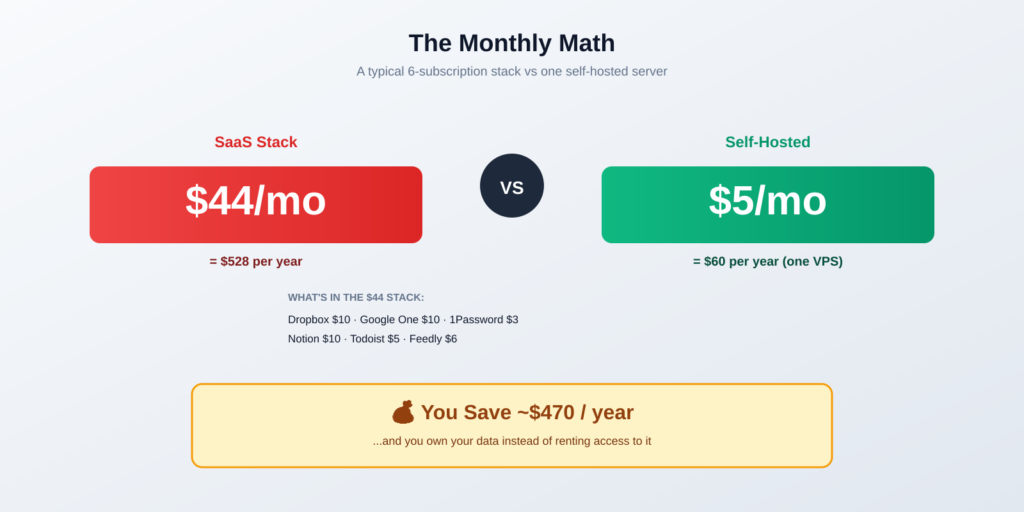
Add up a typical subscription stack against one self-hosted setup:
| Category | Typical SaaS | Self-Hosted |
|---|---|---|
| Cloud storage | Dropbox $9.99/mo | Nextcloud — free |
| Photo backup | Google One $9.99/mo | Immich — free |
| Password manager | 1Password $3/mo | Vaultwarden — free |
| Notes / docs | Notion $10/mo | AppFlowy — free |
| Tasks | Todoist $5/mo | Vikunja — free |
| RSS reader | Feedly $6/mo | FreshRSS — free |
| MONTHLY TOTAL | ~$44/mo | $5/mo (one VPS) |
That’s roughly $470/year in savings — and you own your data instead of renting access to it. The one honest cost: your time for setup and maintenance, plus the discipline to keep backups.
Not every replacement is about money. SearXNG replaces a search engine you already use for free, and what you stop paying is your query history — a trade worth making for different reasons, and with a real catch of its own.
One category the list above misses entirely is budgeting, and it is the one where self-hosting changes the least about how the app feels. Actual Budget runs as a single container with no database beside it, replacing a paid envelope-budgeting subscription — with two catches worth reading before you move your finances onto your own server.
The Honest Tradeoffs of Self-Hosting
This isn’t free money. Before you cancel every subscription, understand what you’re taking on:
- You’re the IT department. Updates, security patches, and troubleshooting are now your job. Budget a few hours a month.
- Backups are non-negotiable. If your disk dies and you have no backup, your data is gone. No support line to call. Set up automated backups from day one.
- Some apps are pre-1.0. A few self-hosted projects still ship breaking changes. Read release notes before updating.
- Uptime is on you. SaaS companies have teams keeping services online 24/7. Your home server depends on your internet and power.
The smart approach: start with one app you already pay for. Get comfortable. Add a second only once the first runs reliably for a few weeks. Most self-hosters end up running 10-20 apps — but they all started with one.
How to Start Self-Hosting Today
The fastest path from reading this to running your first app:
- Pick one app you already pay for. Vaultwarden (replacing a password manager) is the easiest start.
- Get a server. A $5 VPS for cloud access, or a NAS for home storage.
- Install Docker and run the app’s official container.
- Set up automated backups before you trust it with real data.
- Use it for two weeks. If it’s reliable, cancel the subscription and add your next app.
My complete $5 VPS self-hosting guide walks through steps 2-4 in detail, including installing Vaultwarden as your first app.
Frequently Asked Questions About Self-Hosted Apps
What are self-hosted apps?
Self-hosted apps are software you run on your own server (a VPS or home NAS) instead of paying a company to host it for you. You control the data, there’s no monthly fee for the software itself, and nothing leaves your server unless you allow it. Most are free and open source.
Are self-hosted apps actually free?
The software is free. But you pay for the infrastructure to run it — typically a $5/month VPS or a one-time NAS purchase. For someone replacing $40+/month of SaaS subscriptions, the math works out strongly in favor of self-hosting within the first year.
Do I need coding skills to self-host apps?
No. If you can copy-paste commands and follow a guide, you can self-host most apps on this list. Docker has made installation dramatically simpler — many apps are a single command. Easier apps like Vaultwarden and Uptime Kuma are great starting points.
What’s the easiest self-hosted app to start with?
Vaultwarden (a Bitwarden-compatible password manager). It’s a single lightweight container, immediately useful, and runs on the cheapest VPS. It demonstrates the full self-hosting workflow without overwhelming you.
Can I run all these apps on one server?
Most of them, yes. A modest VPS with 4GB RAM or an entry-level NAS can run a dozen lightweight apps simultaneously. Heavier apps (Immich with AI features, Jellyfin transcoding) benefit from more resources, but you can start small and upgrade.
Is self-hosting safe and secure?
It can be, if you follow basics: keep software updated, use a firewall, enable HTTPS, and use strong passwords. Self-hosted apps aren’t inherently less secure than SaaS — but the responsibility shifts to you. For internet-facing apps, a reverse proxy with automatic SSL is essential.
Will self-hosting save me money?
For most people replacing several SaaS subscriptions, yes. A typical stack of cloud storage, photo backup, password manager, and note app runs $40+/month. Replacing it with self-hosted apps on a $5 VPS saves around $470/year — plus you own your data.
The Bottom Line — Start With One App
💡 Takeaway: You don’t need to replace your entire SaaS stack overnight. Pick the one subscription that bothers you most — the password manager, the photo backup, the cloud storage — and self-host just that. Vaultwarden on a $5 VPS is the perfect first step. Once it runs reliably, the rest of this list becomes easy.
The combined savings (~$470/year) are real, but the bigger win is ownership: your passwords, photos, and files live on hardware you control, not on a company’s servers subject to price hikes and policy changes. Start small, back up everything, and grow from there.
Ready to begin? Start with my step-by-step $5 VPS guide, or if you want to store everything at home, see the best NAS for Plex and self-hosting.
How I Chose These Self-Hosted Apps
Every app on this list was selected based on:
- Active development — recent commits and stable releases as of 2026
- Official Docker image for straightforward installation
- A real SaaS product it can genuinely replace, not a niche hobby tool
- Documented production use by real self-hosters in communities like r/selfhosted
- SaaS comparison prices verified against each vendor’s pricing page in 2026
SaaS prices change frequently — always verify current pricing on the vendor’s site before making a decision. The apps here are all free, and the hardware and hosting links earn nothing — there is no affiliate arrangement behind any of them.
Questions or an app you think belongs on this list? Email hello@selfhostlife.com — I read every message.
Product links on this site are plain links. We earn nothing from them — see our disclosure policy.