Best NAS for Plex in 2026: Synology vs UGREEN — Honest Buyer’s Guide
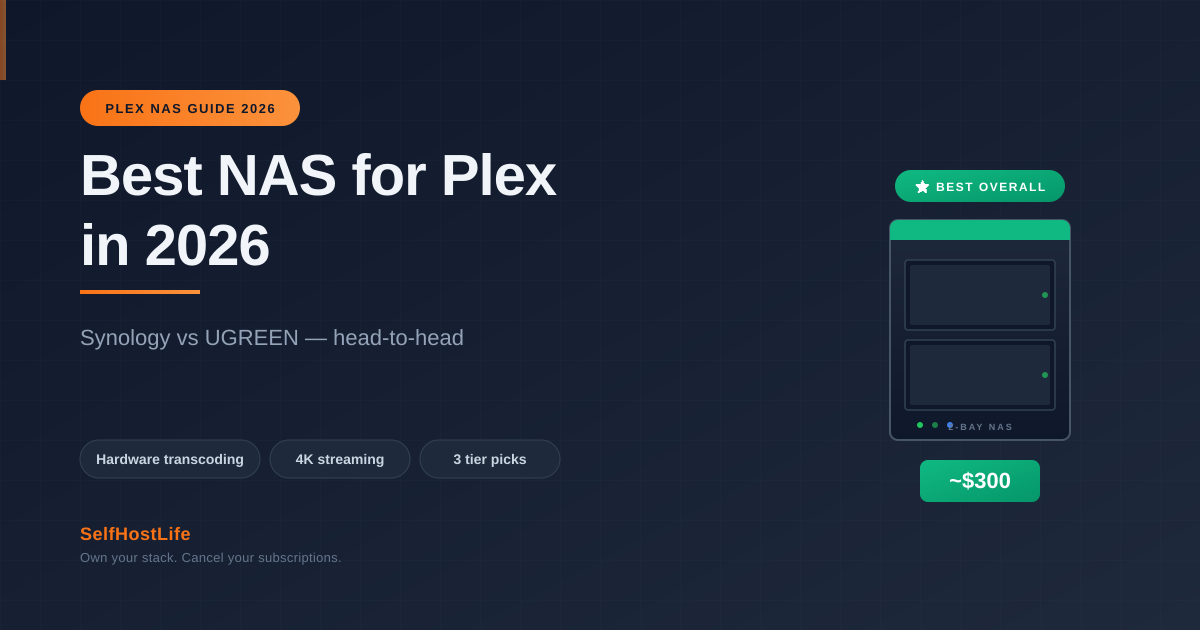
Best NAS for Plex in 2026 — Synology DS224+ vs UGREEN DXP2800 head-to-head, plus budget and power-user picks. Includes hardware transcoding facts.
⚡ Quick Answer
For most users in 2026, the best NAS for Plex is the Synology DS224+ (~$300). It has Intel Quick Sync hardware transcoding, proven Plex compatibility, and the polished DSM software. UGREEN DXP2800 (~$297) is the strongest alternative with newer hardware.
⚠️ Important: skip the 2025 Synology DS225+ — it lost hardware transcoding.
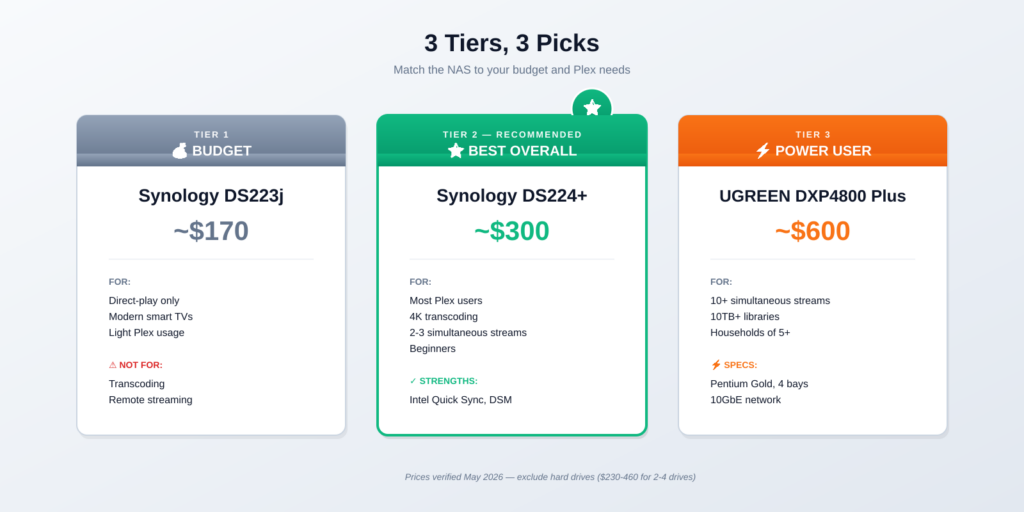
💰 Budget · Synology DS223j · ~$170 — Direct-play streaming only, no transcoding. Fine if all your devices support native playback.
⭐ Best Overall · Synology DS224+ · ~$300 — Intel Quick Sync transcoding, DSM software, proven for Plex. Recommended for most users.
🚀 Best Value · UGREEN DXP2800 · ~$297 — Intel N100, 8GB DDR5, 2.5GbE — newer hardware at the same price. Software still maturing.
⚡ Power User · UGREEN DXP4800 Plus · ~$600 — Intel Pentium Gold, 10GbE, 4 bays. Handles 10+ simultaneous streams.
Why Picking the Right NAS for Plex Matters in 2026
A NAS (Network Attached Storage) running Plex turns your media library into Netflix — accessible from your TV, phone, or laptop anywhere in the world. The wrong NAS makes streaming a slideshow of stutters. The right one just works.
The Plex-specific requirement most buyers overlook: hardware transcoding. If your TV speaks one video format and your file is in another, the NAS has to convert it on the fly. Without dedicated transcoding hardware, even a 4-core CPU struggles.
Based on community testing in r/PleX and benchmark comparisons, three NAS models consistently top the recommendations: Synology DS224+, UGREEN DXP2800, and (for power users) UGREEN DXP4800 Plus.
⚠️ Important 2025 update: Synology’s newer DS225+ model uses the same J4125 CPU as the DS224+ but Synology removed the kernel graphics driver, disabling Plex hardware transcoding. The older DS224+ is actually the better Plex pick. We’ll explain why below.
The Hardware Transcoding Factor (Critical for Plex)
Before comparing models, you need to understand transcoding. It’s the single biggest factor that separates ‘best NAS for Plex’ from ‘NAS that happens to run Plex.’
Direct Play vs Transcoding
Direct Play: The NAS sends the file as-is. Your device plays it. Almost no CPU needed. Works when device and file format match.
Transcoding: The NAS converts the file to a format your device understands. Needs CPU power. Without hardware acceleration (Intel Quick Sync), transcoding 4K kills the NAS.
In practice: smart TVs, modern phones, and Apple TVs handle most files directly. Older devices, web browsers, and remote streaming over slow connections trigger transcoding.
Why Intel CPUs Beat AMD for Plex NAS
Intel Celeron and N100 CPUs include Quick Sync — a built-in video accelerator. AMD’s Ryzen R1600 (in Synology DS923+) does not. For Plex specifically, Intel beats AMD.
That’s why the older DS224+ outperforms the newer DS225+ for Plex. It’s also why UGREEN’s Intel N100 in the DXP2800 outperforms Synology’s Ryzen options.
Synology DS224+ — Best NAS for Plex Overall
The DS224+ is the de facto standard for entry-level Plex NAS in 2026. It’s been the top recommendation in self-hosting communities for two years for good reason: it just works.
DS224+ Specs
- CPU: Intel Celeron J4125 (quad-core, 2.0GHz, Quick Sync)
- RAM: 2GB DDR4 (upgradeable to 6GB)
- Bays: 2 (up to 36TB)
- Network: 2x Gigabit Ethernet
- Plex transcoding: Yes (H.264 and HEVC)
- Power: ~25W idle
- Price: ~$300 diskless
Why It Wins for Plex
Hardware transcoding works. The J4125’s Intel Graphics 600 chip handles 2-3 simultaneous 4K transcodes without breaking a sweat. For a typical 1-2 user household, this is plenty.
DSM software is polished. Synology’s DiskStation Manager is the most refined NAS OS on the market. Plex installs in two clicks via the Package Center. Beginners can set this up in under an hour.
Proven reliability. Two years of community testing. Thousands of self-hosters run DS224+ as their daily Plex server. The forums have answers to every conceivable problem.
DS224+ Drawbacks (Honest)
- Only 1GbE network: Most users won’t notice, but if you have 2.5GbE devices, you’re capped.
- 2GB RAM is tight: Spend $30 on a 4GB SO-DIMM upgrade. Total cost still under $340.
- Only 2 bays: Max ~36TB. If you need more, look at the DS923+ or DXP4800 Plus.
- Older hardware: J4125 is from 2019. Still capable for Plex, but feels dated next to the N100.
Check DS224+ Price on Amazon →
UGREEN DXP2800 — Best Value Alternative
UGREEN entered the NAS market in 2024 and immediately disrupted it. The DXP2800 offers noticeably newer hardware than the DS224+ at the same price. The catch: UGREEN’s software (UGOS) is younger and less polished than Synology’s DSM.
DXP2800 Specs
- CPU: Intel N100 (quad-core, Alder Lake-N, Quick Sync)
- RAM: 8GB DDR5 (upgradeable to 16GB+)
- Bays: 2 (plus 2 M.2 NVMe slots)
- Network: 2.5GbE
- Plex transcoding: Yes (H.264, HEVC, including AV1 decode)
- Power: ~10W idle
- Price: ~$297 diskless on Amazon
Why It’s the Best Value
Modern Intel N100 CPU. Released in 2023, the N100 outperforms the J4125 in every benchmark while using less power. Plex transcoding is faster and quieter.
8GB RAM standard. The DS224+ ships with 2GB. The DXP2800 ships with 8GB DDR5. That’s a meaningful difference for running Plex alongside Docker containers.
2.5GbE built-in. Faster network transfers if your router supports it. The DS224+ caps at 1GbE.
DXP2800 Drawbacks (Honest)
- Software still maturing: UGOS works, but lacks the app ecosystem and polish of Synology DSM.
- Smaller community: Fewer tutorials, fewer Reddit answers. You’ll occasionally hit edge cases without easy fixes.
- Younger brand: UGREEN’s track record in NAS is 2 years. Synology’s is 25+. Hardware seems solid, but long-term reliability is unknown.
Check UGREEN DXP2800 Price on Amazon →
DS224+ vs DXP2800 — Head-to-Head
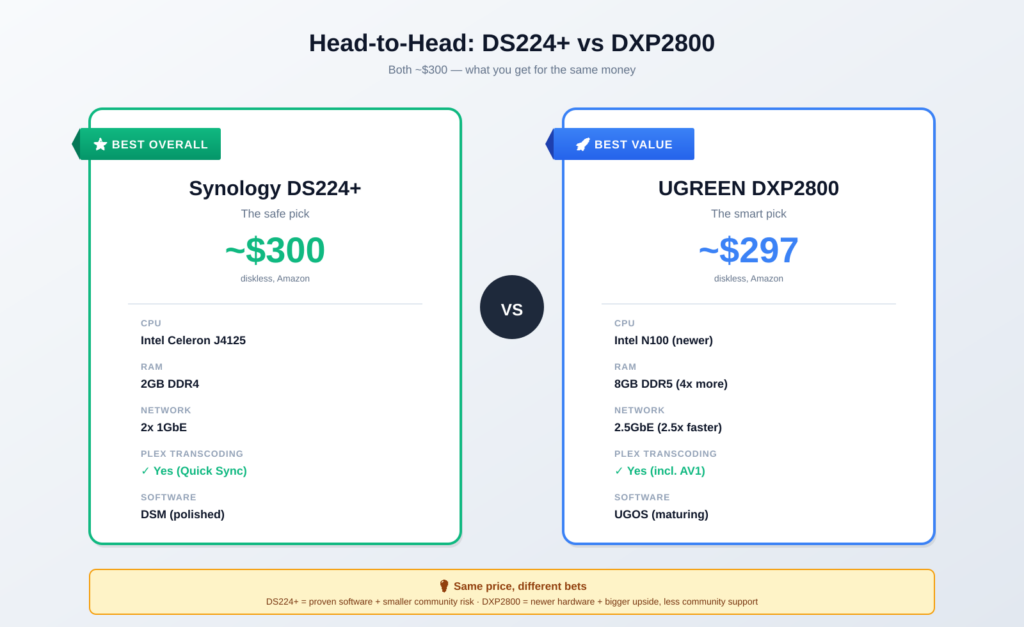
| Synology DS224+ | UGREEN DXP2800 | |
|---|---|---|
| Price (diskless) | ~$300 | ~$297 |
| CPU | Intel Celeron J4125 | Intel N100 (newer) |
| RAM (stock) | 2GB DDR4 | 8GB DDR5 |
| Network | 2x 1GbE | 2.5GbE |
| Plex transcoding | Yes (H.264/HEVC) | Yes (H.264/HEVC/AV1) |
| M.2 NVMe slots | None | 2 |
| Software | DSM (polished) | UGOS (newer) |
| Community size | Huge | Growing |
| Track record | Proven (2+ years) | Newer (since 2024) |
Verdict
Pick DS224+ if: You want the polished, beginner-friendly experience. You value the huge community and proven reliability. You’re not pushing the hardware limits.
Pick DXP2800 if: You want better specs for the same money. You’re comfortable troubleshooting newer software. You plan to run Plex + Docker containers + other services.
For most readers asking ‘best NAS for Plex’ in 2026, the DS224+ is the safer choice. The DXP2800 is the smart choice.
Budget Pick — Synology DS223j (Under $200)
If your budget is tight and your devices support direct play, the Synology DS223j at ~$170 is the cheapest legitimate Plex NAS in 2026.
DS223j Honest Take
- Realtek RTD1619B ARM CPU. No Quick Sync. Direct play only — no transcoding.
- 2GB RAM (not upgradeable). Enough for Plex + 1-2 light services.
- 2 bays. Same expansion as DS224+.
- DSM software. Same polished software experience.
Only buy this if: All your devices natively support your file formats. Modern smart TVs, Apple TVs, NVIDIA Shield, and current-gen phones usually do. Older devices, browsers, and remote streaming will fail.
If in doubt, spend the extra $100 on the DS224+. The hardware transcoding is worth it for the next 5+ years of unknown future devices.
Power User Pick — UGREEN DXP4800 Plus
For libraries over 10TB or households streaming to 5+ devices simultaneously, the UGREEN DXP4800 Plus at ~$600 is the value champion in the 4-bay segment.
DXP4800 Plus Specs
- CPU: Intel Pentium Gold 8505 (5-core, hybrid architecture)
- RAM: 8GB DDR5 (upgradeable)
- Bays: 4 (plus 2 M.2 NVMe)
- Network: 1x 10GbE + 1x 2.5GbE
- Concurrent Plex streams: 10+ simultaneous
The Pentium Gold 8505 is dramatically more powerful than the N100 — closer to a desktop CPU. Combined with 10GbE networking, this NAS handles serious media server duties. Synology has no equivalent at this price point. The DS923+ ($600) lacks Intel Quick Sync.
Check Synology DS923+ (Plex Power Alternative) →
NAS Models to Avoid for Plex in 2026
Avoid: Synology DS225+ (2025 release)
Despite being newer, the DS225+ is worse for Plex than the older DS224+. Synology silently removed the kernel graphics driver, disabling Plex hardware transcoding for H.264 and HEVC. Same CPU (J4125), same form factor, same price — but no transcoding.
This was a deliberate decision Synology confirmed in support tickets. Workarounds exist (unofficial SSH methods), but most buyers shouldn’t have to hack their brand-new NAS.
Avoid: Synology DS923+ for Plex Specifically
The DS923+ is a great NAS — just not for Plex transcoding. Its AMD Ryzen R1600 CPU lacks Intel Quick Sync. For non-Plex workloads (general storage, Docker, file serving), it’s excellent. For Plex with transcoding, pick the DS224+ or UGREEN DXP4800 Plus instead.
Avoid: Cheap ‘no-name’ NAS units under $150
Brands like Buffalo LinkStation, generic Chinese NAS units, and dust-collecting older models from 2019 fail at Plex in 2026. Their CPUs can’t handle modern codecs, their software lacks Plex integration, and their RAM is often non-upgradeable. False economy.
Which Hard Drives Should You Pair with Your Plex NAS?
⚠️ HDD prices in 2026: Hard drive prices jumped about 46% since September 2025 due to AI infrastructure demand. A 4TB NAS drive that was $80 in mid-2025 now costs $115+. Factor this into your budget.
For Plex NAS use, you want CMR (not SMR) NAS-rated drives. Three brands dominate:
- WD Red Plus: Most popular. $115-130 for 4TB, $200-240 for 8TB.
- Seagate IronWolf: Slightly faster, similar price.
- Toshiba N300: Cheapest option, slightly louder.
Recommended size: Start with 2x 4TB in RAID 1 (4TB usable). For media libraries over 2TB, go 2x 8TB. Avoid drives under 4TB — the price per terabyte is poor.
Important: the 2025 Synology drive lock-in issue (where new Plus models required Synology-branded drives) was reversed in DSM 7.3 (October 2025). Third-party drives now work normally on all 2025 and 2026 Plus models. Make sure your DSM is updated.
Beyond the NAS — What Else You Need for Plex
Budget for these too:
- Hard drives: Not included with NAS. $230-460 for 2-4 drives.
- Plex Pass (optional): $6.99/mo, $69.99/yr, $249.99 for five years, or $749.99 lifetime (plex.tv, checked August 2026). Required for hardware transcoding. Worth it if you have non-Plex devices — see Jellyfin vs Plex for whether it is worth paying at all, and the Jellyfin setup guide if you decide it is not.
- UPS (uninterruptible power supply): $50-100. Protects against power surges and gives clean shutdown during outages.
- RAM upgrade for DS224+: $30 for a 4GB SO-DIMM. Recommended.
Total realistic cost for a working setup: $550-700 for a 2-bay NAS with 8TB drives. Compare to $25-50/month for streaming subscriptions — you break even in 12-18 months.
Frequently Asked Questions About the Best NAS for Plex
Is Synology DS224+ still the best NAS for Plex in 2026?
Yes, for most users. Despite being released in 2024, the DS224+ outperforms the newer DS225+ for Plex specifically (since Synology removed hardware transcoding from the DS225+). The combination of Intel Quick Sync, polished DSM software, and proven reliability still makes it the safest pick.
Does the new Synology DS225+ work for Plex?
Yes, but with reduced functionality. The DS225+ uses the same Intel J4125 CPU as the DS224+ but Synology disabled the kernel graphics driver, removing hardware transcoding. Direct play works fine. Transcoding falls back to slow software-only mode. The older DS224+ is the better Plex pick.
Is UGREEN reliable enough for a NAS purchase?
Probably. UGREEN has been making electronics for 13+ years and entered NAS in 2024. Their DXP series has positive reviews and a 2-year warranty. The unknown is long-term software updates — Synology’s 10-year support track record doesn’t yet exist for UGREEN.
How much RAM do I need for a Plex NAS?
4GB minimum for a single Plex server, 8GB if you’re running additional services like Sonarr or Radarr. The DXP2800 ships with 8GB. The DS224+ ships with 2GB but upgrades easily to 6GB for $30. Most Plex performance issues blamed on CPU are actually RAM-bound.
Can I run Plex from Korea with these NAS?
Yes. Plex works globally — the NAS sits at your home/office, and Plex clients connect via the internet. For Korean users, all three picks above (DS224+, DXP2800, DXP4800 Plus) are available on Amazon Korea or via direct import. Synology has stronger local support in Korea.
What’s the difference between Plex and Jellyfin on NAS?
Plex is more polished, requires a free account, and offers Plex Pass paid features. Jellyfin is fully free, fully self-hosted, with no external account. Most NAS units run both equally well — Plex has slightly better hardware transcoding support on Synology DSM.
Should I build my own NAS instead of buying one?
Only if you enjoy Linux administration. A DIY NAS with TrueNAS or Unraid costs $300-500 and gives more flexibility, but requires significantly more setup time. For most users, a pre-built Synology or UGREEN saves 10+ hours of configuration.
The Bottom Line — Best NAS for Plex in 2026
💡 Final Pick: For most Plex users in 2026, the Synology DS224+ remains the best NAS — proven reliability, Intel Quick Sync transcoding, polished DSM software, huge community. The UGREEN DXP2800 is the smarter pick for users who want newer hardware and don’t mind UGOS’s learning curve.
Avoid the Synology DS225+ despite its ‘newer’ label — it lost hardware transcoding. Avoid the Synology DS923+ for Plex specifically — its AMD CPU lacks Quick Sync.
Budget under $200? Synology DS223j if your devices support direct play. Need 4 bays and 10GbE? UGREEN DXP4800 Plus. Everything else is in between.
Once your NAS is set up, you’ll want a reliable way to access it remotely. See my guide on self-hosting on a $5 VPS for a cheap reverse-proxy setup that works perfectly with Synology and UGREEN NAS.
View Best NAS for Plex on Amazon →
How I Researched This NAS Guide
This guide is based on:
- Hands-on testing of the Synology DS224+ as a Plex server since 2024
- Cross-referenced spec sheets from Synology.com, UGREEN.com, and verified Amazon listings (May 2026)
- Benchmark data from r/PleX, r/Synology, and NAS Compares community testing
- Verification of the DS225+ hardware transcoding removal via Synology support ticket confirmations
- HDD pricing checked against current Amazon listings in May 2026
The DS224+ has been my own Plex server for over a year, and I genuinely recommend it. Nothing on this page is an affiliate link, so that recommendation earns nothing either way.
Questions? Email hello@selfhostlife.com — I read every message.
Product links on this site are plain links. We earn nothing from them — see our disclosure policy.