Best Home Server OS in 2026: Proxmox vs TrueNAS vs Unraid vs Plain Linux
The best home server OS in 2026 depends on your goal: Proxmox for VMs, TrueNAS for storage, Unraid for ease, plain Linux for control. Practical guide.
⚡ Quick Answer
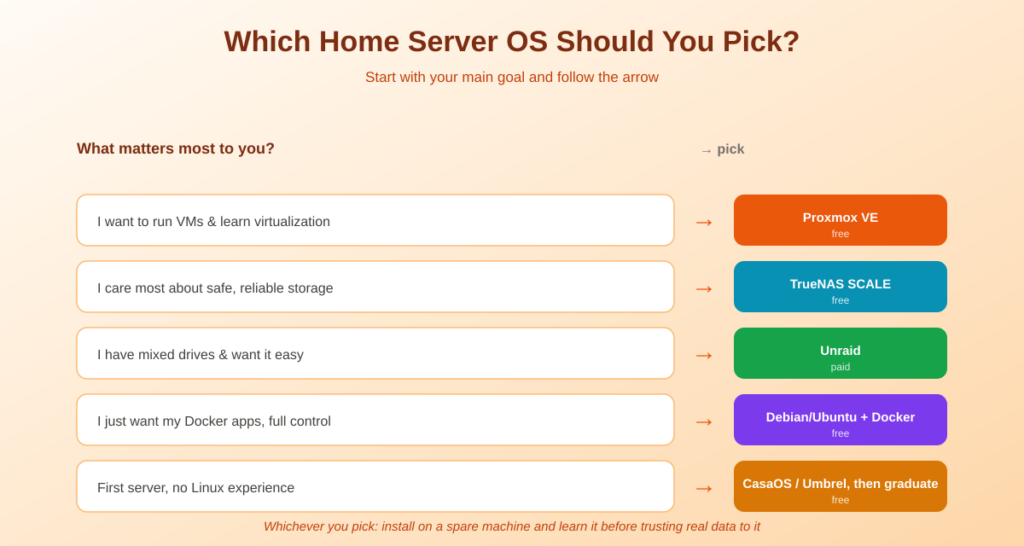
There’s no single best home server OS — there’s the best one for your goal. Want to run virtual machines and learn enterprise virtualization? Proxmox VE. Storage and data integrity above all? TrueNAS Community Edition. Easiest path with mismatched drives? Unraid (paid). Just want your Docker apps running with full control? Plain Debian or Ubuntu. This guide explains what each is genuinely good at, the hardware each needs, and how to match one to what you’re actually building.
You bought the hardware — a mini PC, a NAS box, or an old desktop. Now comes the question every guide skips: what do you actually install on it? The home server OS you choose decides what’s easy, what’s possible, and what’ll have you searching forums at midnight. The good news is that 2026’s options are more mature than ever. The catch is they’re built on genuinely different philosophies, so ‘best’ depends entirely on your goal. Let’s match one to yours.
The Four Choices That Matter
Ignore the dozens of niche options. For a home server in 2026, four approaches cover almost everyone, and they split cleanly by what they’re built around:
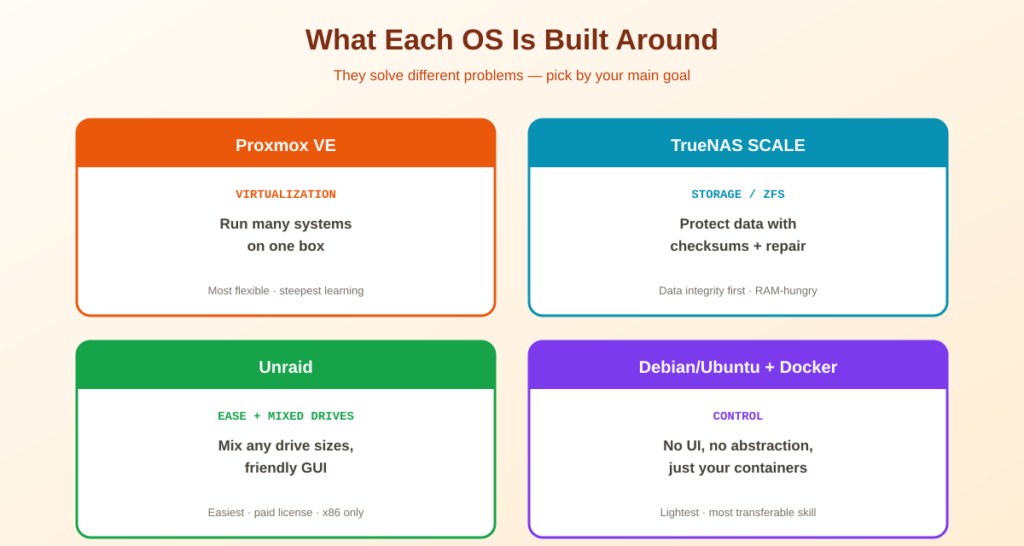
- Proxmox VE — built around virtualization. A bare-metal hypervisor that runs virtual machines and lightweight Linux containers. You can run several ‘computers’ on one box. Free and open source.
- TrueNAS Community Edition — built around storage. A ZFS-based NAS platform whose whole reason for existing is keeping your data intact. Free, with an app catalog for common services.
- Unraid — built around flexibility and ease. Parity-based storage that lets you mix drive sizes, with a beginner-friendly GUI and great Docker/VM support. Paid: the licence is perpetual, but only the top tier keeps giving you new OS releases.
- Plain Linux (Debian/Ubuntu) + Docker — built around control. No web UI, no abstraction — just an OS and your containers. Maximum control, minimal hand-holding.
Proxmox VE — for Virtualization and Learning
Proxmox VE is a Type-1 hypervisor built on Debian. Its superpower is running multiple isolated systems on one machine — a Windows VM here, a Linux container running Docker there, a Home Assistant VM alongside. It has snapshot backups, GPU passthrough, and a capable web UI, all free. The popular community pattern is running Proxmox as the base and then virtualizing everything else (even TrueNAS) on top of it.
- Best for: anyone who wants to run VMs, experiment freely, snapshot before changes, and grow without hitting a ceiling.
- Watch out for: the steepest learning curve of the four. Plan to spend real time learning it. Minimum 8 GB RAM, 16 GB+ comfortable.
TrueNAS Community Edition — for Storage and Data Integrity
TrueNAS Community Edition — the free edition, called TrueNAS SCALE until the 25.04 “Fangtooth” release on 15 April 2025 merged the old CORE and SCALE lines into one product — is a Debian-based NAS OS built on the ZFS filesystem, which has protected enterprise data for over 20 years. Its checksumming and automatic error correction catch silent data corruption before it spreads — not a nice-to-have when the server holds your family photos or backups. It has a clean share-management UI and an app catalog (Plex, Nextcloud, Syncthing, and more) deployable from the web interface.
- Best for: storage-first builds where data integrity is the top priority — a NAS that also runs some apps.
- Watch out for: ZFS is memory-hungry (16 GB RAM is a sensible minimum, roughly 1 GB per TB), and it strongly prefers identical-sized drives — mixing sizes wastes capacity. It’s a NAS platform first, not a general hypervisor.
If a prebuilt box appeals more than rolling your own, see the best NAS for Plex guide.
Unraid — for Ease and Mixed Drives
Unraid is the most beginner-friendly of the powerful options. Its standout trick is a parity system that lets you mix drive sizes freely — add whatever disks you have, expand one at a time, and keep redundancy. It boots from a USB stick, has a polished app catalog, and handles Docker and VMs well. The trade-off: it’s the only paid option here, and it’s x86-only — so no Raspberry Pi. You buy it once rather than subscribing, but since Unraid restructured its tiers the licence and the updates are separate things. Starter is $49 for up to six storage devices and Unleashed is $109 for unlimited devices, and both include one year of OS updates; Lifetime at $249 includes them permanently (unraid.net, checked 31 August 2026). Your server keeps running after the year is up — you just stop receiving new versions until you extend.
- Best for: media-server builds, people with a pile of mismatched drives, and those who want capability without a steep learning curve.
- Watch out for: the license cost, and that it won’t run on ARM hardware like a Pi.
Plain Debian/Ubuntu + Docker — for Control
Sometimes the best home server OS is just a plain Linux install with Docker on top. Install Debian or Ubuntu Server, write one docker-compose.yml for your whole stack, and version-control it. There’s no web UI and no abstraction layer — which means total control and nothing hiding between you and your services. It’s also the lightest option and the most transferable skill, since you’re learning Linux and Docker directly rather than one vendor’s interface.
- Best for: people comfortable with a terminal who just want their apps running with full control and minimal overhead — and anyone who already knows the Docker workflow.
- Watch out for: no GUI safety net. You manage storage and updates yourself. If that sounds tiring rather than freeing, pick one of the others.
This path leans entirely on the Docker workflow — learn that first and this becomes easy.
Home Server OS Comparison at a Glance
| OS | Built around | Best for | Cost | Min RAM |
|---|---|---|---|---|
| Proxmox VE | Virtualization (VMs + containers) | Learning, running many systems | Free | 8 GB |
| TrueNAS Community Edition | Storage (ZFS integrity) | NAS-first, protecting data | Free | 16 GB |
| Unraid | Flexibility + ease | Mixed drives, easy media server | Paid, $49-$249 | 4-8 GB |
| Debian/Ubuntu + Docker | Control (no abstraction) | Terminal-comfortable, full control | Free | 2 GB+ |
💡 The honest beginner advice: If you’re genuinely undecided and have no Linux experience, start small: a friendly app-store-style OS like CasaOS or Umbrel builds confidence fast, and you can graduate later. Or, if you’re willing to learn, install your chosen OS on a spare machine first — break it, rebuild it, and understand it before trusting it with real data. Every hour spent learning before production is an hour saved at midnight six months later.
Frequently Asked Questions About Home Server OS Choices
What is the best home server OS in 2026?
There’s no single winner — it depends on your goal. Proxmox VE is best for running virtual machines and learning virtualization, TrueNAS Community Edition for storage and data integrity, Unraid for an easy GUI with mixed-size drives, and plain Debian or Ubuntu with Docker for maximum control. Match the OS to what you’re building rather than chasing one ‘best’ answer.
Is Proxmox or TrueNAS better for a home server?
They solve different problems. Proxmox is a hypervisor built for running virtual machines and containers, ideal if you want to run several systems on one box. TrueNAS is a NAS platform built around ZFS for rock-solid storage. A common setup runs Proxmox as the base with TrueNAS as a VM, giving you both — though that adds complexity versus running either one alone.
Is Unraid worth paying for?
For many people, yes. Unraid’s ability to mix different drive sizes while keeping redundancy, plus its polished app catalog and beginner-friendly interface, saves real time and money on drives. You buy the licence once rather than subscribing, but check what you are buying: only the $249 Lifetime tier includes OS updates indefinitely, while $49 Starter and $109 Unleashed include one year (checked 31 August 2026). Free alternatives like TrueNAS and Proxmox exist, but they trade off ease or drive flexibility.
Do I need Proxmox or can I just use Docker on Linux?
You can absolutely just use Docker on plain Debian or Ubuntu — many people run their entire stack that way with one compose file. Proxmox adds value when you want to run full virtual machines, isolate different workloads, snapshot whole systems, or experiment safely. If you only need containerized apps and are comfortable in a terminal, plain Linux plus Docker is simpler.
How much RAM does a home server OS need?
It varies by OS. Plain Debian or Ubuntu with Docker runs in as little as 2 GB. Proxmox wants 8 GB minimum, 16 GB comfortable. TrueNAS Community Edition needs the most because ZFS is memory-hungry — 8 GB minimum but 16 GB or more is sensible, roughly 1 GB per TB of storage. Unraid is the lightest of the NAS-style options at 4-8 GB.
Can I run a home server OS on a Raspberry Pi?
Some, yes. Plain Debian/Ubuntu (Raspberry Pi OS) with Docker runs beautifully on a Pi, and lightweight app-store OSes like CasaOS work too. But Proxmox is x86-focused, TrueNAS effectively needs x86 and lots of RAM, and Unraid is x86-only. For a Pi, stick with a plain Linux plus Docker approach.
Should I install the OS on the same drive as my data?
No — keep the OS on a separate drive from your data whenever possible. This makes reinstalling or switching the OS far safer, since your data drive stays untouched. As a bonus, standard filesystems like ext4 or XFS can be read on other Linux systems, and ZFS pools can be imported elsewhere, so your data isn’t locked to one OS. Always back up before switching.
The Bottom Line
🖥️ Takeaway: The best home server OS is the one that matches your goal. Want virtualization and room to grow? Proxmox VE. Storage and data integrity first? TrueNAS Community Edition. Mixed drives and an easy GUI? Unraid (paid). Just want your Docker apps running with full control? Plain Debian or Ubuntu. Whichever you pick, install it on a spare machine first and learn it before trusting it with real data — and keep the OS on a separate drive from your files.
Need hardware to run it on? See the best mini PC guide. Then learn the Docker workflow and put your apps behind HTTPS with a reverse proxy.
How This Guide Was Researched
- TrueNAS product naming confirmed at truenas.com on 31 August 2026: the free edition is TrueNAS Community Edition, renamed from SCALE in 25.04 (April 2025), and CORE is now archived as legacy
- Each OS’s design focus (Proxmox = hypervisor, TrueNAS = ZFS storage, Unraid = parity/mixed drives, plain Linux = control) verified across multiple 2026 home-server comparisons
- Hardware needs (Proxmox 8 GB+, TrueNAS 16 GB / ~1 GB per TB for ZFS, Unraid 4-8 GB, Linux 2 GB+) cross-referenced across current sources
- Unraid tier prices and update windows taken from unraid.net on 31 August 2026; x86-only limitation and mixed-drive parity confirmed across independent guides
- The common Proxmox-host-with-TrueNAS-VM pattern and the keep-OS-separate-from-data advice reflect consistent community guidance
Always check each project’s official site for current requirements and licensing — for example the Proxmox VE site. These projects have no affiliate programs; this guide earns nothing from them.
Questions about your setup? Email hello@selfhostlife.com.
Product links on this site are plain links. We earn nothing from them — see our disclosure policy.