Immich: The Self-Hosted Google Photos Alternative (2026)
Immich is an open-source photo platform you host yourself: automatic phone backup, AI search, and face recognition, with nothing sent to Google.
⚡ Quick Verdict
Immich is the first self-hosted photo app that genuinely feels like Google Photos — automatic phone backup, AI-powered search, and face recognition, all running on a server you own. Immich self-hosting in 2026 is mature enough for daily family use (it hit a stable v2.0 in October 2025), needs about 6 GB of RAM for the AI features, and asks one thing in return: you must take backups seriously. This guide covers why, how, and the trap to avoid.
Google Photos is the hardest cloud service to quit, because the thing it does — silently backing up every photo and making your whole library searchable — is genuinely useful. Immich finally makes leaving realistic. It’s an open-source photo platform that replicates the Google Photos experience almost feature for feature, except your memories live on hardware you control instead of Google’s servers. Here’s how it works and how to set it up.
What Is Immich?
Immich is a free, open-source, self-hosted photo and video platform — a direct Google Photos alternative. It started in 2022 and grew to over 87,000 GitHub stars by early 2026, making it one of the fastest-growing self-hosted projects ever. The reason is simple: it’s the first one that feels like a consumer product, not a technical experiment.
What it gives you, all running on your own server with nothing sent to a third party:
- Automatic phone backup. Native iOS and Android apps upload new photos in the background, exactly like Google Photos. Set it once and forget it.
- AI smart search. Search by natural language — ‘beach sunset’, ‘birthday cake’, ‘dog in snow’ — powered by CLIP machine-learning models running locally on your hardware.
- Face recognition. Automatically groups photos by the people in them, entirely offline.
- Albums, sharing, map view, RAW support. Shared albums, a map of where photos were taken, and multi-user accounts so each family member gets their own private library.
✓ It’s stable now: For most of its history Immich displayed a warning that it wasn’t ready for irreplaceable photos. That warning was removed with the stable v2.0 release in October 2025. It now follows semantic versioning, but it still moves fast — pin a version and read the release notes before upgrading.
Why Self-Host Your Photos Instead of Using Google?
Privacy comes first
Your photos are the most personal data you own — the faces of your family, where you live, where you travel. On Google Photos, those images live on Google’s servers, can be scanned, and may be used to train machine-learning models. With Immich, they never leave your hardware. The AI features run locally, with nothing sent out.
The cost adds up
Google gives 15 GB free across all Google services, then charges monthly forever. Google reshuffled its consumer plans during 2026 — paid storage now arrives bundled with its AI tiers rather than as a flat 2 TB plan — but the shape of the deal is unchanged: a bill that never stops arriving. I work the five-year arithmetic in the cloud storage cost breakdown. A 4 TB NAS drive, by contrast, is a one-time purchase of roughly $115-130 after the 2025-26 price rises. Over a few years, self-hosting wins decisively on cost.
No lock-in
Policies change, prices rise, accounts get locked. Self-hosted, open-source Immich can’t raise your price or hold your memories hostage. Your library is yours, in standard files, on your disk.
If you’re weighing the broader money question, see does self-hosting actually save money.
What You Need to Self-Host Immich
Immich asks for a bit more than a lightweight app like a password manager, because the AI features need memory. Plan for:
- RAM: 6 GB is the official minimum with machine learning enabled; 8 GB+ is comfortable. On less (a 4 GB Pi), you can use lighter ML models or offload ML.
- Storage: This is the big one. A typical phone photo is 3-8 MB and a video 30-150 MB. A family with 100,000 photos and 5,000 videos needs roughly 500 GB to 1.5 TB. Plan storage you can expand.
- Where to run it: A home NAS or mini PC is ideal (your storage, your network). A VPS works too if you want access from anywhere, though large libraries get expensive on rented storage.
A home NAS or mini PC is the natural home for a photo library — local storage is cheap and your originals never leave the house.
How Immich Is Built
Immich isn’t one program — it’s four Docker containers working together, which is why the AI features are so capable. Knowing the pieces helps when something needs troubleshooting:
- Immich Server: the API, web interface, and upload handling — what your phone talks to.
- Machine Learning: runs face recognition and CLIP smart search, on demand.
- PostgreSQL (with pgvector/VectorChord): the database storing albums, faces, and the vector data that powers search.
- Redis/Valkey: an in-memory cache for the background job queue.
How to Set Up Immich Self-Hosting
STEP 1 Get the Official Docker Compose Files
On your server, make a folder and pull Immich’s official compose file and environment template:
mkdir immich && cd immich
curl -Lo docker-compose.yml https://github.com/immich-app/immich/releases/latest/download/docker-compose.yml
Also download the matching .env file the same way. Using the official files means you get the tested, recommended configuration.
STEP 2 Set Your Upload Location
In the .env file, set UPLOAD_LOCATION to the folder where your photos will live — ideally on your large storage drive. This is the single most important setting: it’s where your irreplaceable originals will be stored, and the folder you’ll back up.
STEP 3 Start Immich
Bring the stack up:
sudo docker compose up -dAll four containers start and connect over Docker’s private network. Open your server’s address on port 2283 in a browser, and you’ll see Immich’s first-run wizard — create your admin account with an email and password.
STEP 4 Install the Mobile App and Enable Backup
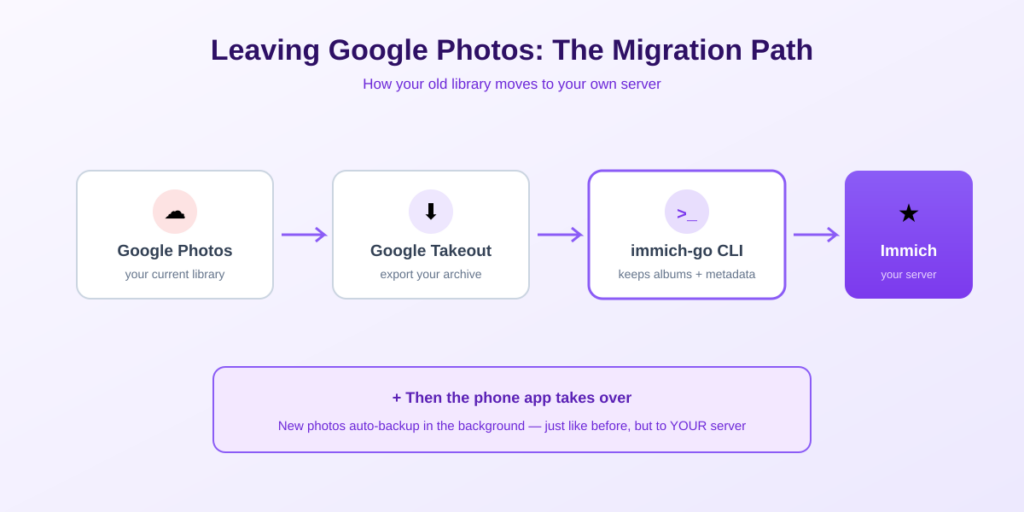
This is the step that turns Immich into something your family relies on. Install the Immich app (App Store, Google Play, or F-Droid), enter your server URL and login, and enable backup. You can choose which albums sync and restrict uploads to Wi-Fi so you never burn mobile data.
💡 First-sync tip: If you’re importing a big existing camera roll, the initial upload can take hours. Start with one small album to confirm everything works end to end, then enable full backup and let it run overnight.
STEP 5 Migrate Your Existing Google Photos (Optional)
To bring your history over, request a Google Takeout export of your photos, then use the immich-go CLI tool to import the archive — it preserves albums and metadata far better than a plain file copy. After that, your old library and new photos all live together in Immich.
The One Thing You Must Not Skip: Backups
This is the responsibility self-hosting hands you, and Immich’s own developers stress it more than anything else: never make Immich the only copy of your photos. A cloud service quietly kept redundant copies for you; now that’s your job. There are two separate things to back up, and you need both:
- The photo and video files. These live in your UPLOAD_LOCATION folder. They’re ordinary files, so any backup tool (restic, rclone, Borg) can copy them — ideally to offsite object storage like Backblaze B2 as a second copy.
- The database. PostgreSQL holds your albums, face data, and all the metadata tying the library together. Back it up with the database-dump method in Immich’s official docs. Without it, the image files alone won’t restore your organized library — you’d lose every album and face assignment.
⚠️ Follow 3-2-1. Three copies of your data, on two types of media, with one offsite. Photos are irreplaceable in a way documents aren’t — there is no ‘redownload’ for your child’s first steps. Set up automated backups the same day you set up Immich, not ‘later.’
Immich vs Other Google Photos Alternatives
Immich is the best pick for most people specifically because of phone auto-backup and its polished mobile apps — the features that made Google Photos indispensable. Two alternatives are worth knowing:
- PhotoPrism: a mature, web-focused library with great AI tagging, simpler to run (fewer containers), but its mobile auto-backup story is weaker — it leans on WebDAV sync rather than a first-party background app.
- Ente: end-to-end encrypted, the strongest privacy choice, but self-hosting its server is a newer path and ML runs on your devices rather than the server.
If phone backup that ‘just works’ is your priority — and for most ex-Google-Photos users it is — Immich is the default recommendation.
Immich is also one of the standouts in our roundup of 10 self-hosted apps that replace SaaS.
Frequently Asked Questions About Immich Self-Hosting
Is Immich a good Google Photos alternative?
Yes — it’s the closest self-hosted equivalent available in 2026. It matches Google Photos on the features that matter most: automatic background phone backup, AI-powered natural-language search, face recognition, shared albums, and a polished mobile app. The main difference is that everything runs on your hardware, and you handle backups yourself.
Is Immich free?
Yes. Immich is completely free and open source, including the iOS and Android apps. There’s no subscription and no premium tier. Your only cost is the hardware it runs on and any offsite backup storage you choose to add.
How much RAM does Immich need?
The official minimum is 6 GB with machine learning (face recognition and smart search) enabled; 8 GB or more is comfortable. On a 4 GB device like a Raspberry Pi you can still run it by using lighter ML models or offloading the ML workload, though performance will be slower on large libraries.
How much storage do I need for Immich?
It depends on your library. A typical phone photo is 3-8 MB and a video 30-150 MB, so a family with 100,000 photos and 5,000 videos needs roughly 500 GB to 1.5 TB. Choose hardware where you can expand storage later, such as a NAS with spare drive bays.
Is self-hosting Immich safe for my only photo copy?
No — never make Immich your only copy. Immich’s own developers stress this. Self-hosting shifts backup responsibility to you: back up both the photo files (UPLOAD_LOCATION folder) and the PostgreSQL database, ideally following a 3-2-1 strategy with one offsite copy. With proper backups, it’s very safe; without them, it’s risky.
Can I import my existing Google Photos into Immich?
Yes. Request a Google Takeout export of your photos, then use the immich-go CLI tool to import the archive. It preserves albums and metadata much better than a plain file copy, so your history and new photos end up in one organized library.
Does Immich work without an internet connection?
Yes. Immich runs entirely on your own server, so on your home network it works fully offline — backup, search, and face recognition all run locally. You only need internet exposure (via a reverse proxy or a tool like Tailscale) if you want to back up or view photos when away from home.
The Bottom Line
📸 Takeaway: Immich self-hosting gives you a private, free Google Photos experience — auto phone backup, AI search, and face recognition — on hardware you own. Since the stable v2.0 release it’s ready for daily family use. Budget about 6 GB of RAM and enough storage for your library, run it on a NAS or mini PC, and set up backups the same day you set up Immich. Your memories are irreplaceable; treat the backup step as the price of ownership.
New to all this? Start with what self-hosting actually is, pick hardware with the NAS guide, and secure remote access with Tailscale.
How This Guide Was Researched
- Immich architecture (four containers, CLIP search, local face recognition) verified against the official Immich project and multiple 2026 setup guides
- Stable v2.0 release (October 2025) and the removal of the ‘not for irreplaceable photos’ warning confirmed across independent sources
- Hardware guidance (6 GB RAM minimum, 3-8 MB per photo, 500 GB-1.5 TB for a typical family library) cross-referenced across multiple guides
- The backup imperative (files plus database, 3-2-1) reflects Immich’s own developer guidance
Immich develops quickly — always check the official Immich documentation for the current version and configuration before installing. Immich has no affiliate program; this guide earns nothing from it.
Questions about your setup? Email hello@selfhostlife.com.
Product links on this site are plain links. We earn nothing from them — see our disclosure policy.