Self-Hosting Backup Strategy: The 3-2-1 Rule in Practice (2026)
Self-hosting backup made practical: the 3-2-1 rule, which tools to use (restic, Borg), cheap offsite storage, and why testing your restore matters most.
⚡ The One Rule That Matters
Self-hosting gives you control of your data — and full responsibility for not losing it. The whole discipline fits in one number: 3-2-1. Keep 3 copies of your data, on 2 different types of media, with 1 copy offsite. Do that, automate it, and actually test a restore, and you’ll survive a dead drive, a ransomware hit, or a house fire. This guide turns self-hosting backup from a vague worry into a concrete, finished setup.
Every app guide on this site ends with the same warning: back up your data. Immich, Nextcloud, Vaultwarden — they all hand you the responsibility a cloud service used to quietly handle. Self-hosting backup is that responsibility made real. The good news: it’s a solved problem with a 40-year-old rule and a couple of excellent free tools. This guide covers the 3-2-1 strategy, what to actually back up, which tools to use, and the step almost everyone skips.
The 3-2-1 Rule: Your Whole Strategy in One Number
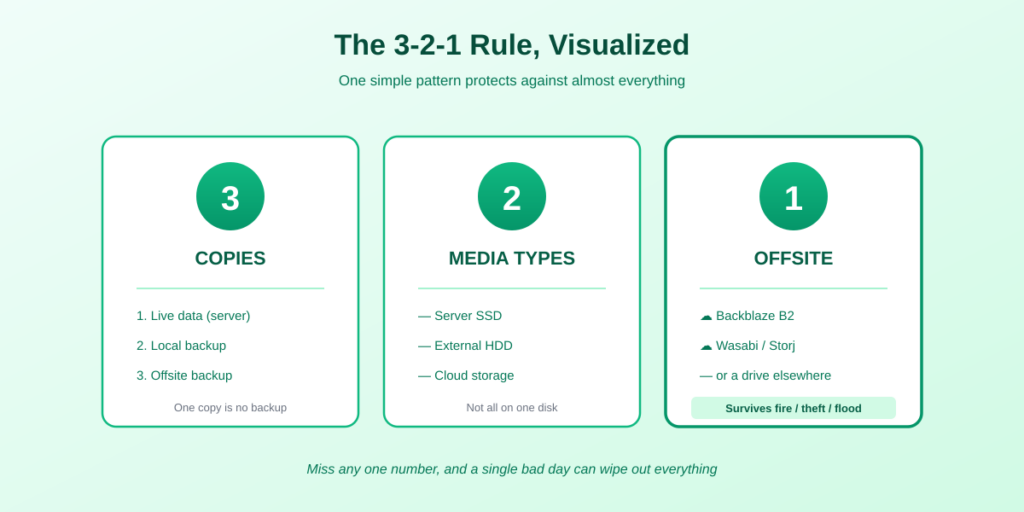
The backbone of all backup strategy was formalized in the 1980s and still holds. Self-hosting backup comes down to three numbers:
- 3 copies of your data. The live copy you use every day, plus two backups. One copy is no backup; if it’s the only one and it fails, the data is gone.
- 2 different media types. Don’t keep all copies on the same kind of storage. Your server’s SSD plus an external HDD plus cloud object storage counts; three folders on the same disk does not.
- 1 copy offsite. At least one backup must live somewhere else — cloud storage or a drive at another location. This is the copy that survives theft, fire, or flood taking out your whole home.
💡 Why offsite is non-negotiable: The classic way to lose everything is to keep the backups on the machine they are backing up. Daily database dumps written to the same server look like a backup right up to the moment a controller fails, a filesystem corrupts, or the box is stolen — and then both copies go at once. Local backups protect against a dead drive; only an offsite copy protects against losing the whole machine.
In the ransomware era this is sometimes extended to 3-2-1-1-0: one of the offsite copies should be immutable (it can’t be altered or deleted, so ransomware can’t encrypt it), and your backups should restore with zero errors. For a home setup, plain 3-2-1 done properly is already a massive win — don’t let the fancier version stop you from starting.
What You Actually Need to Back Up
You don’t back up everything — you back up what you can’t easily recreate. For a self-hosted server, that’s three things:
- Databases (the most critical). Apps like Immich, Nextcloud, and Vaultwarden store their structure — albums, users, metadata, relationships — in a database (usually PostgreSQL or MySQL). The files alone won’t restore a working app without it. Always take a proper database dump, not just a copy of the live database files.
- Your actual files. Photos, documents, media, and the volumes your apps store data in. These are usually the largest part and the most irreplaceable — there’s no re-downloading your own family photos. If those volumes are Docker named volumes, see how to back up a Docker volume for how to reach them.
- Configuration. Your docker-compose.yml files, reverse-proxy configs, and TLS certificates. Backing these up turns disaster recovery from days of reconstruction into minutes of redeploying.
⚠️ The database trap. Copying a database’s files while the database is running often produces a corrupt, unrestorable backup. Always use the database’s dump tool (pg_dump for PostgreSQL, mysqldump for MySQL) to create a clean export, then back up that dump file. Most app guides, including Immich’s and Nextcloud’s, document the exact dump command — use it.
The Tools: What to Use in 2026
You don’t need enterprise software. Two free, open-source tools cover almost every home setup, and one is the clear default.
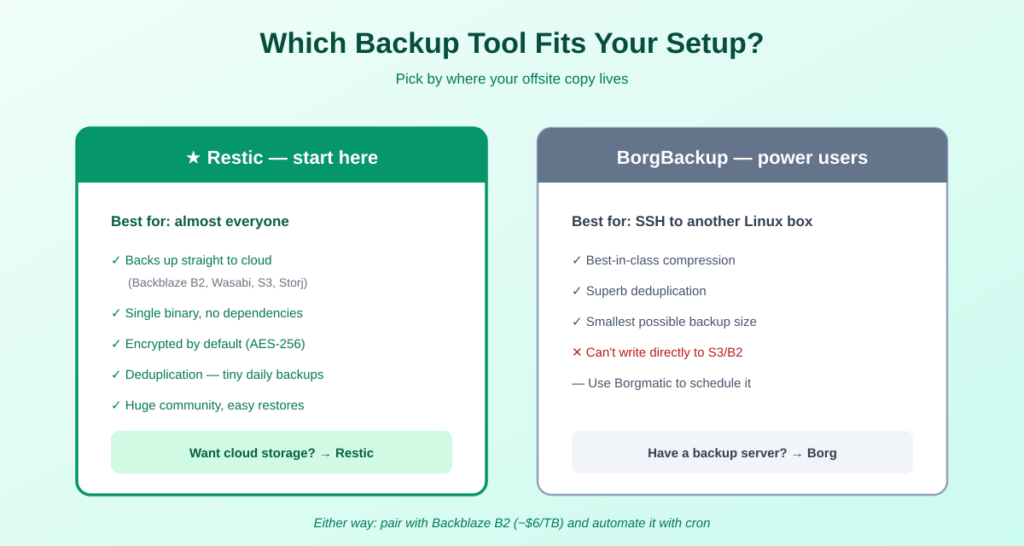
Restic — the recommended default
Restic is the near-standard for self-hosters in 2026, and the right starting point for almost everyone. It’s a single binary with no dependencies, it encrypts everything by default (AES-256), and it deduplicates — after the first backup, it only stores changed chunks, so a daily backup of a 50 GB app might transfer well under 500 MB. Crucially, it backs up directly to cheap cloud storage: Backblaze B2, Wasabi, AWS S3, SFTP, or a local disk.
BorgBackup — for the storage-obsessed
BorgBackup (Borg) has the best compression in the business and superb deduplication, making it ideal if you’re backing up over SSH to another Linux machine and want the smallest possible size. Its catch: it can’t back up directly to S3/B2 cloud storage — it needs a Linux server with SSH as the target. If you want cloud, use Restic; if you have a dedicated backup box, Borg is excellent. Borgmatic is the standard wrapper that adds scheduling.
Cheap Offsite Storage
For the offsite copy, S3-compatible object storage is the sweet spot — pennies per month for a home setup:
- Backblaze B2 — $6 per TB per month, S3-compatible, the most popular pairing with Restic. The usual first choice.
- Wasabi — $6.99 per TB per month with no egress fees (under a fair-use policy), good if you might restore large amounts often.
- Storj — $4 per TB per month, decentralized and S3-compatible, the cheapest of the three.
For a typical home server with 100-200 GB of irreplaceable data, the offsite cloud bill is often around $1-2 a month — trivial insurance against total loss.
Automate It — and Then Actually Test It
Two steps separate a real backup from a false sense of security. First, automate. A manual backup is one you’ll forget within two weeks. Schedule it with a cron job or systemd timer — for example, a nightly script that dumps your databases, then runs a restic backup to B2. Add monitoring with a free service like Healthchecks.io or Uptime Kuma, so you get an alert if a backup ever fails silently. A backup that’s been quietly failing for a month is the worst kind.
Second, and most important: test your restore. This is the step nearly everyone skips, and it’s the one that matters most.
🔑 The golden rule: A backup you have never restored from is not a backup — it’s a hope. The only way to know your backups work is to actually restore from them. Once a quarter, pull a random file (or a whole snapshot) from your backup and confirm it opens. Restic makes this easy with restic restore. The day your server dies is the wrong time to discover your backups were corrupt.
restic restore latest --target /tmp/restore-testFrequently Asked Questions About Self-Hosting Backup
What is the 3-2-1 backup rule?
The 3-2-1 rule says to keep 3 copies of your data, on 2 different types of media, with 1 copy offsite. For a self-hosted server that means your live data, a local backup on a separate disk, and an encrypted copy in cloud storage like Backblaze B2. It’s the foundational backup strategy and protects against drive failure, theft, and disasters at once.
What’s the best backup tool for self-hosting?
For most people, Restic. It’s free and open source, installs as a single binary, encrypts everything by default, deduplicates to save space, and backs up directly to cheap cloud storage like Backblaze B2 or Wasabi. BorgBackup is an excellent alternative if you back up over SSH to another Linux machine and want maximum compression, but it can’t write directly to cloud storage.
How do I back up a self-hosted database?
Use the database’s own dump tool, not a file copy. For PostgreSQL use pg_dump and for MySQL use mysqldump to create a clean export, then back up that dump file with restic or Borg. Copying the live database files while the database is running often produces a corrupt, unrestorable backup, so always dump first.
How much does offsite backup storage cost?
Very little for a home setup. Backblaze B2 is about $6 per TB per month, Wasabi $6.99 per TB with no egress fees, and Storj around $4 per TB. A typical home server with 100-200 GB of irreplaceable data usually costs $1-2 a month for the offsite copy — cheap insurance against losing everything.
Do I really need an offsite backup?
Yes. Local backups protect against a single drive failing, but not against theft, fire, flood, or a hardware fault that corrupts every disk in the machine at once. The offsite copy is the one that survives losing your whole server or home. It’s the single most important part of the 3-2-1 rule and the one people most often skip.
How often should I back up my self-hosted server?
For most home setups, a nightly automated backup is the sweet spot. Because tools like Restic only transfer changed data, daily backups are fast and cheap after the first one. Automate it with a cron job or systemd timer, and add monitoring so you’re alerted if a backup ever fails silently.
Why do I need to test my backups?
Because a backup you’ve never restored from is just a hope, not a guarantee. Backups can fail silently or become corrupt, and you won’t know until you try to restore — which is a catastrophic time to find out. Restore a random file or snapshot once a quarter to confirm your backups actually work. It takes minutes and is the difference between real safety and false confidence.
The Bottom Line
🛟 Takeaway: Self-hosting backup isn’t complicated — it’s the 3-2-1 rule made real: three copies, two media types, one offsite. Back up your databases (with proper dumps), your files, and your configs; use Restic to cheap cloud storage like Backblaze B2; automate it with cron and monitoring; and test a restore every quarter. Do this once, and the responsibility self-hosting hands you stops being scary. Your data is yours — backing it up properly is how you keep it that way.
This matters most for your irreplaceable data — set it up before you trust Immich or Nextcloud with your only copy. New here? Start with self-hosting explained.
How This Guide Was Researched
- The 3-2-1 rule (and its 3-2-1-1-0 ransomware-era extension) verified against multiple 2026 backup-strategy sources
- Tool guidance (Restic as the default, BorgBackup for SSH/compression, the cloud-backend difference) cross-referenced across independent 2026 comparisons
- Offsite storage pricing (Backblaze B2 ~$6/TB, Wasabi ~$6.99/TB, Storj ~$4/TB) confirmed across current sources
- The database-dump requirement and the ‘test your restore’ principle reflect consistent guidance across self-hosting backup guides
Backup tools evolve — always check the official Restic documentation for current commands. These tools have no affiliate program; this guide earns nothing from them.
Questions about your setup? Email hello@selfhostlife.com.
Product links on this site are plain links. We earn nothing from them — see our disclosure policy.