Nextcloud: Self-Host Your Own Google Drive (2026 Guide)
Nextcloud is a self-hosted Google Drive and Dropbox replacement: file sync, calendar, contacts, and browser-based office, all on your own server.
⚡ Quick Verdict
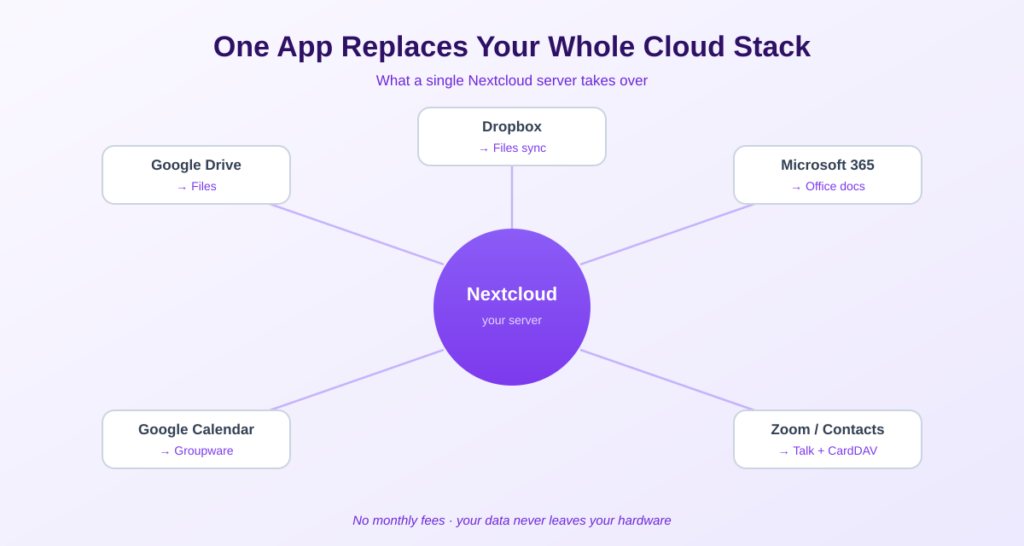
Nextcloud is the most complete self-hosted replacement for Google Drive, Dropbox, and even parts of Microsoft 365 — file sync, calendar, contacts, and browser-based office documents, all on your own server. Nextcloud self-hosting is powerful but heavier than single-purpose apps: budget 4 GB of RAM, an x86 server, and HTTPS. This guide covers what it does, how to set it up the recommended way, and the honest cases where you shouldn’t bother.
If you want one self-hosted app to replace your whole cloud-office stack, Nextcloud is it. Where most self-hosted tools do one thing, Nextcloud is a full collaboration hub: file sync like Dropbox, calendar and contacts like Google, and document editing like Office — all under your control, with no subscription. It’s the most capable option in this space, and also the most demanding, so this guide is honest about both sides.
What Is Nextcloud?
Nextcloud is a free, open-source collaboration platform — the most complete self-hosted alternative to Google Drive, Dropbox, and Microsoft 365. You can read more at the official Nextcloud site. Rather than doing one job, it bundles a whole suite of tools called Nextcloud Hub:
- Files: Dropbox-style sync with desktop and mobile apps, file sharing, and version history.
- Groupware: Calendar and contacts that sync via CalDAV/CardDAV, replacing Google Calendar and Contacts.
- Office: Collabora-powered document editing in the browser — a real Google Docs / Microsoft 365 alternative.
- Talk: Built-in video calls and chat, end-to-end encrypted.
- App store: Hundreds of plugins — password managers, Kanban boards, notes, and more — so you tailor it to your needs.
Everything runs on your own hardware, with no monthly fee and no third party able to scan your files. It’s the digital-sovereignty option for people who want to leave Big Tech’s cloud entirely.
It’s the ‘Dropbox replacement’ I point to in 10 self-hosted apps that replace SaaS — here’s the full how-to.
Should You Self-Host Nextcloud? An Honest Look
Nextcloud is powerful, but it isn’t the right answer for everyone. Here’s the honest framing before you commit a weekend to it.
Self-host Nextcloud if…
- You want to replace several cloud services (Drive + Calendar + Docs) with one private platform.
- You value data ownership and privacy enough to do some maintenance.
- You already run a home server or VPS and want a file/calendar layer on it.
- You’re a family or small group — the per-user economics get very attractive past ~10 users.
Maybe don’t, if…
You only need simple file sync (a lighter tool like Seafile or Syncthing is faster — Nextcloud’s PHP core makes large transfers slower), or you’re setting it up for non-technical people who will be frustrated when a sync icon misbehaves. For a small team that just wants ‘a shared drive that works,’ a paid service is sometimes the saner call. Self-hosting earns its keep when privacy, ownership, or multi-service consolidation matter to you — not as a chore you’ll resent.
What You Need to Self-Host Nextcloud
Nextcloud is heavier than a single-container app. Plan realistically:
- RAM: 4 GB minimum for the recommended All-in-One setup; 8 GB comfortable for a family using Office. A bare 1 GB VPS will swap and crawl.
- CPU: x86 strongly recommended. Nextcloud’s AIO Docker images are x86-first; ARM (like a Raspberry Pi) works but builds can lag and feel slower.
- Storage: At least 50 GB for personal use; 500 GB-2 TB for a family with photos. Plan room to grow — roughly 50 GB per person per year of photos is a useful rule of thumb.
- A domain + HTTPS: Required for the mobile apps and secure access. A reverse proxy handles the certificate.
A mini PC or NAS (x86, 8 GB) is the ideal home for Nextcloud. A $5 VPS works for a couple of users if it has enough RAM.
How to Self-Host Nextcloud (the Recommended Way)
As of 2025-26, the recommended install method is Nextcloud All-in-One (AIO) — a Docker deployment that bundles the Nextcloud server, database, Redis cache, Collabora Office, and backup tooling into one managed master container. It’s now the officially supported path, not a side project, and it spares you the messy manual configuration.
STEP 1 Point a Domain at Your Server
Add a DNS A record pointing a subdomain (e.g. cloud.yourdomain.com) to your server’s IP. Nextcloud needs this for HTTPS and the mobile apps.
STEP 2 Install Docker
If Docker isn’t installed, use the official convenience script, then add your user to the docker group:
curl -fsSL https://get.docker.com | sh
sudo usermod -aG docker $USER
STEP 3 Run the Nextcloud AIO Container
Start the AIO master container following the official Nextcloud AIO instructions. It exposes an admin interface on port 8080 where you’ll complete setup. Keep that admin port restricted to your own IP — never open it to the world.
💡 Put it behind a reverse proxy: Run Nextcloud AIO behind a reverse proxy like Caddy or Nginx Proxy Manager with valid TLS. This gives you clean HTTPS on your domain and is the configuration the AIO setup expects. If you self-host other apps, you likely already have a proxy running.
STEP 4 Complete the Web Setup
Open the AIO admin interface, set your domain, and let it pull and start the containers. It generates a master password you must save. Once it finishes, your Nextcloud is live at https://cloud.yourdomain.com — log in and you’re running your own cloud.
STEP 5 Install the Apps and Migrate
Install the Nextcloud desktop client (Windows/Mac/Linux) and mobile app (iOS/Android), point them at your domain, and your folders sync like Dropbox. To migrate, export from Google Takeout or Dropbox, then upload; for calendar and contacts, export as iCal/vCard and import into Nextcloud.
⚠️ Test backup AND restore before you trust it. Nextcloud AIO includes backup tooling — use it, and actually test a restore on a second server before you put irreplaceable data in. Upgrade one major version at a time (e.g. 28 → 29 → 30, never skipping), because Nextcloud is more prone to breaking when many apps are enabled. Backups are your job now.
A Note on Performance
Be realistic: Nextcloud’s PHP foundation makes it slower at large file transfers than lighter alternatives. In independent tests syncing an 11 GB folder, Seafile finished in about 6 minutes and Nextcloud took around 17. For everyday documents, photos, and sync this is rarely noticeable — but if raw transfer speed for huge files is your priority, Seafile or Syncthing may suit you better. You’re trading some speed for Nextcloud’s all-in-one breadth.
Frequently Asked Questions About Nextcloud Self-Hosting
Is Nextcloud a good Dropbox alternative?
Yes — it’s the most complete one. Nextcloud gives you Dropbox-style file sync plus calendar, contacts, and office documents, all on your own server with no subscription. It’s heavier than Dropbox to run, but it replaces several services at once and keeps your data fully private.
Is Nextcloud free?
Yes. Nextcloud is 100% free and open source, including the desktop and mobile apps and the full Hub suite (Files, Calendar, Contacts, Talk, and Office via Collabora). There’s no per-user fee. Your only cost is the server it runs on.
How much RAM does Nextcloud need?
Plan for 4 GB minimum with the recommended All-in-One (AIO) setup, and 8 GB for a comfortable family experience with Office enabled. A 1 GB VPS will swap and feel sluggish within days. Personal single-user setups can run on 2 GB but AIO prefers more.
What is Nextcloud AIO?
Nextcloud All-in-One (AIO) is the officially recommended installation method as of 2025-26. It’s a Docker deployment that bundles the Nextcloud server, database, Redis cache, Collabora Office, and backup tools into one managed master container, automating the configuration that used to be done by hand.
Can I run Nextcloud on a Raspberry Pi?
Yes, but with caveats. A Raspberry Pi 4 or 5 with 4-8 GB RAM runs Nextcloud for light personal use, often via the NextcloudPi script. However, the AIO Docker images are x86-first, so ARM builds can lag and feel slower. For a smooth multi-user experience, an x86 mini PC or NAS is better.
Is Nextcloud secure for self-hosting?
Yes, with proper setup. Used by governments and enterprises worldwide, Nextcloud with HTTPS, two-factor authentication, and a hardened server can exceed the security of many commercial clouds. Keep it behind a reverse proxy, restrict the admin port, and apply updates promptly.
Nextcloud vs Seafile — which should I choose?
Choose Nextcloud if you want an all-in-one platform (files plus calendar, contacts, and office). Choose Seafile if you mainly want fast, efficient file sync — its C/Python core handles large transfers 2-3x faster than Nextcloud’s PHP. Nextcloud is broader; Seafile is leaner and quicker for pure sync.
The Bottom Line
☁ Takeaway: Nextcloud self-hosting gives you a private, free replacement for Google Drive, Dropbox, and parts of Microsoft 365 — files, calendar, contacts, and office, all on your hardware. Install it the recommended way with Nextcloud AIO on an x86 server with 4 GB+ of RAM behind HTTPS, and test your backups before trusting it. It’s the most capable self-hosted cloud — just go in knowing it’s heavier than single-purpose apps, and skip it if all you need is fast, simple file sync.
New to this? Start with the self-hosting primer, choose hardware via the mini PC guide, and secure remote access with Tailscale.
How This Guide Was Researched
- Nextcloud Hub features (Files, Groupware, Office via Collabora, Talk, app store) verified against the official Nextcloud project and multiple 2026 guides
- All-in-One (AIO) as the recommended 2025-26 install method confirmed across independent sources
- Hardware guidance (4 GB RAM minimum for AIO, x86 recommended, 50 GB+ storage) cross-referenced across multiple deployment guides
- Performance comparison (Nextcloud slower than Seafile on large transfers due to PHP) drawn from independent benchmark testing
Nextcloud and its Docker images change quickly — always follow the official Nextcloud AIO documentation for current setup steps. Nextcloud has no affiliate program; this guide earns nothing from it.
Questions about your setup? Email hello@selfhostlife.com.
Product links on this site are plain links. We earn nothing from them — see our disclosure policy.