Home Server Power Consumption in 2026: What It Really Costs to Run 24/7
Home server power consumption explained for 2026: real watt and dollar numbers for a Pi, mini PC, and NAS — plus how to cut the cost of running one 24/7.
⚡ The Short Answer
For a sensible self-hosting setup, almost nothing. A Raspberry Pi costs $5-13 a year to run. An efficient N100 mini PC runs $16-40 a year. Even a small two-bay NAS is usually $24-48 a year. Home server power consumption only becomes a real expense when you repurpose an old gaming PC or desktop — those can quietly cost $130-240 a year. Pick efficient hardware and the electricity is a rounding error against the subscriptions you’re replacing.
“Won’t running a server 24/7 wreck my electricity bill?” It’s the most common worry that stops people from self-hosting — and for the right hardware, it’s almost entirely unfounded. Home server power consumption for a purpose-built low-power device is tiny: often less than you spend on a single streaming subscription per year. The catch is hardware choice. This guide gives you the real watt-and-dollar numbers for each option, the simple formula to calculate your own, and the cases where the bill actually does add up.
How to Calculate Home Server Power Consumption
Before the numbers, here’s the one formula that lets you work out the cost of any device running around the clock. It’s simpler than it looks:
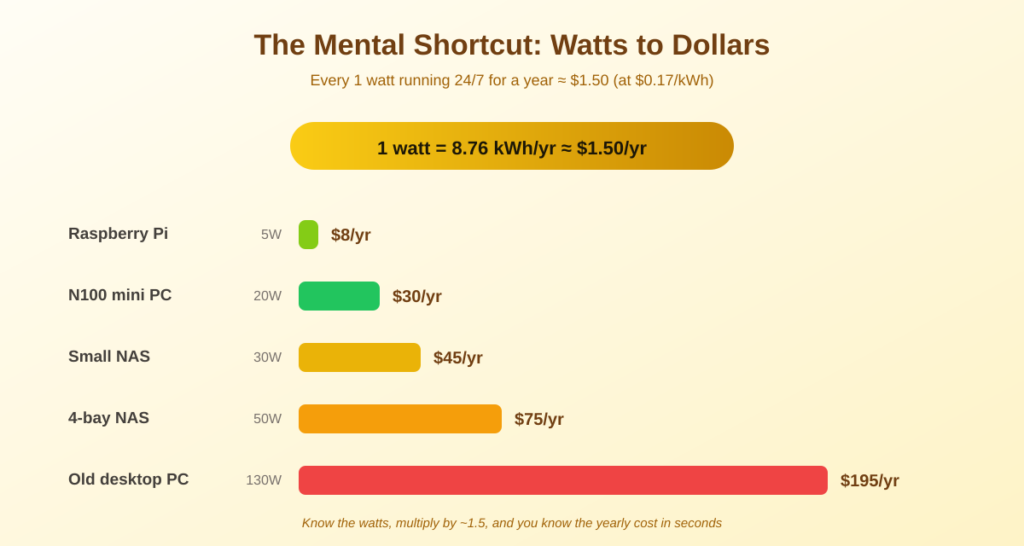
🧮 The formula: Annual cost = (watts ÷ 1000) × 24 hours × 365 days × your electricity rate. The handy shortcut: every 1 watt running 24/7 for a year uses about 8.76 kWh. At the US average of 18.34¢/kWh (EIA, June 2026), that means roughly $1.61 per year for each watt your server draws.
That shortcut is the key to the whole topic. 1 watt ≈ $1.60 a year. So a server idling at 10 watts costs about $16 a year; one at 50 watts about $80. Once you know your device’s typical draw, you know your yearly cost in seconds — and you can see immediately why a 5-watt Pi and a 150-watt converted gaming rig are in completely different leagues.
Your electricity rate matters too. The US average was 18.34¢/kWh in June 2026 (EIA), but it varies a lot by state — roughly $0.10 in Washington, $0.13-0.15 in Texas, around $0.30 in California, and over $0.40 in Hawaii. Check your own bill for the accurate figure.
Real Power Consumption by Hardware Type
Here are typical real-world figures for common home server hardware, with annual cost calculated at the US average of 18.34¢/kWh. These reflect realistic mixed idle/light-load operation, not peak draw:
| Hardware | Typical draw | Per year | Per month |
|---|---|---|---|
| Raspberry Pi 5 | ~3-8 W | ~$5-13 | ~$0.40-1 |
| N100 mini PC | ~10-25 W | ~$16-40 | ~$1-3 |
| 2-bay NAS (e.g. Synology) | ~15-30 W | ~$24-48 | ~$2-4 |
| 4-bay NAS w/ HDDs | ~35-55 W | ~$56-88 | ~$5-7 |
| Old desktop as server | ~80-150 W | ~$130-240 | ~$11-20 |
The pattern is clear: purpose-built low-power hardware costs almost nothing to run, while a repurposed full-size PC is where the bill bites. A Pi at under $13 a year is cheaper than one month of most streaming services — for a whole year of running your own cloud.
This is a big reason the Raspberry Pi and mini PC are the recommended starting points — not just purchase price, but running cost too.
Does the Electricity Cost Cancel Out the Savings?
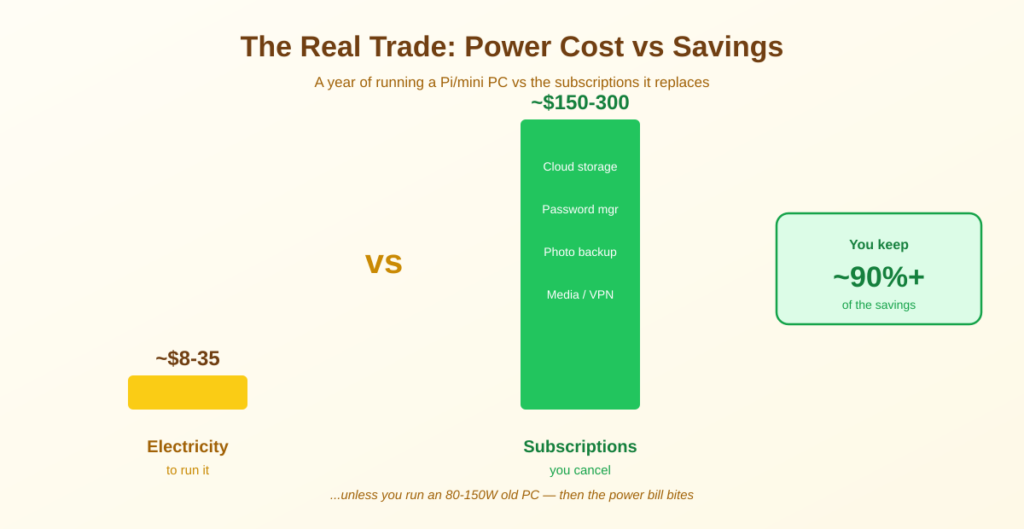
This is the question that actually matters for your wallet. The whole point of self-hosting is replacing monthly subscriptions — so does the power bill eat those savings? Almost never, for efficient hardware. Consider a typical setup replacing cloud storage, a password manager, and a photo service. Those subscriptions might total $150-300 a year. Running a Pi or mini PC to replace them costs $5-40 a year in electricity. You keep the overwhelming majority of the savings.
The math only gets uncomfortable if you run power-hungry hardware. A 150-watt old desktop at about $240 a year could erase the savings from a couple of modest subscriptions. The lesson isn’t “don’t self-host” — it’s “don’t self-host on a power-guzzling machine.” Efficiency is the whole game.
For the full money picture beyond electricity, see does self-hosting save money.
How to Cut Your Home Server Power Consumption
If you want to trim the bill further, these are the levers that actually move the needle, roughly in order of impact:
- Choose efficient hardware first. This dwarfs everything else. A Pi or N100 mini PC instead of an old tower can be a 10x difference in running cost — no tweaking required.
- Use SSDs over spinning hard drives where you can. Each HDD adds 5-9 watts; an SSD adds under 2. For a media library you may need HDDs, but for the OS and apps, SSDs cut both power and noise.
- Let drives spin down when idle. A NAS that parks its disks overnight can cut drive power significantly. (Weigh this against the debate about wear from frequent spin-ups — for most home use, scheduled spin-down is fine.)
- Consolidate onto one box. Running five services on one efficient mini PC beats five separate always-on devices. Virtualization or Docker lets one machine do a lot.
- Skip Wake-on-LAN scheduling unless you must. Powering down 12 hours a day halves cost, but you lose 24/7 access and automated backups — usually not worth it for a 10-watt device that costs $16 a year anyway.
⚠️ Don’t over-optimize a tiny number. Spending hours shaving watts off a device that already costs $16 a year is a poor use of time. Get the hardware choice right, make the obvious SSD and consolidation moves, and then stop — the electricity simply isn’t a number worth obsessing over at this scale.
Frequently Asked Questions About Home Server Power Consumption
How much does it cost to run a home server 24/7?
It depends entirely on the hardware. A Raspberry Pi costs $5-13 a year, an efficient N100 mini PC around $16-40, and a small two-bay NAS roughly $24-48, all at the US average of 18.34¢/kWh (EIA, June 2026). Only power-hungry options like a repurposed gaming PC (80-150 watts) reach $130-240 a year. For sensible hardware, it’s a few dollars a month at most.
How do I calculate my home server’s power cost?
Use this formula: (watts ÷ 1000) × 24 × 365 × your electricity rate. The shortcut is that every 1 watt running 24/7 for a year costs about $1.49 at the US average rate. So a 20-watt server costs roughly $30 a year. Plug in your device’s typical wattage and your own rate from your bill.
Does a home server use a lot of electricity?
No, not if you choose efficient hardware. A Raspberry Pi or mini PC draws 3-25 watts — comparable to a couple of LED bulbs — and costs under $35 a year to run continuously. ‘A lot’ of electricity only applies to old desktops or gaming PCs converted to servers, which can draw 80-150 watts.
Is a Raspberry Pi or mini PC cheaper to run as a server?
A Raspberry Pi is cheaper on pure electricity — roughly 5 watts versus 10-12 for a comparable mini PC, a difference of about $9 a year. That gap is small enough that capability, x86 compatibility, and hardware longevity usually matter more than the electricity difference when choosing between them.
Does running a home server cancel out my subscription savings?
Almost never with efficient hardware. Replacing $150-300 a year of subscriptions while spending $8-35 a year on electricity for a Pi or mini PC keeps the vast majority of the savings. The only scenario where power costs erode the benefit is running a high-wattage old PC as your server.
What uses the most power in a home server?
Hard drives and the CPU platform. Each spinning hard drive adds 5-9 watts, so a multi-drive NAS is dominated by its disks. After that, the base platform matters: a low-power ARM or Intel N100 board draws far less than a full desktop CPU and motherboard. SSDs and an efficient platform are the two biggest savings.
Should I turn my home server off at night to save power?
Usually not worth it for low-power hardware. Powering down 12 hours a day roughly halves the cost, but for a device that only costs $15 a year, you’d save about $7 while losing 24/7 access, remote availability, and overnight backups. For a high-wattage server it makes more sense; for a Pi or mini PC, just leave it on.
The Bottom Line
💡 Takeaway: Home server power consumption is a non-issue for sensible hardware. A Raspberry Pi runs for about $8 a year, a mini PC for $15-35, a small NAS for $45-75 — all trivial next to the subscriptions you’re replacing. Remember the shortcut: 1 watt running 24/7 costs roughly $1.50 a year. The only way to get a scary electricity bill is to self-host on an old gaming PC. Choose efficient hardware, and the power cost stops being a reason to hesitate.
Ready to start? Pick hardware with the mini PC or Raspberry Pi guide, and see what to run on it in 10 self-hosted apps.
How This Guide Was Researched
- Power draw figures (Pi 5 ~3-8 W, N100 mini PC ~10-25 W, NAS 15-55 W, old desktop 80-150 W) cross-referenced across multiple independent 2026 measurements
- US average residential electricity rate of 18.34¢/kWh, from the EIA Electric Power Monthly (table 5.6.A), June 2026 figure, checked 2026-08-30
- The 1 watt ≈ 8.76 kWh/year ≈ $1.49/year shortcut derived from the standard kWh formula
- Annual cost figures calculated at the US average rate for realistic mixed idle/light-load operation
Electricity rates change and vary by location — check your own utility bill, or use a plug-in power meter for an exact reading. The US Energy Information Administration publishes current average residential rates.
Questions about your setup? Email hello@selfhostlife.com.
Product links on this site are plain links. We earn nothing from them — see our disclosure policy.