How to Connect a Domain to Your Self-Hosted Server (2026)
A domain name for self-hosting made simple: where to buy one cheap, how DNS records work, and how to point it at a VPS or a home server with dynamic DNS.
⚡ What This Solves
Every HTTPS and remote-access guide says the same thing: ‘point your domain at your server’ and ‘add a DNS A record.’ If that instruction has left you stuck, this is the missing piece. A domain name for self-hosting turns http://203.0.113.10:8096 into vault.yourdomain.com — memorable, and required for real HTTPS. This guide covers where to buy a domain cheaply, how DNS records actually work, and the two different ways to point one at a server: a VPS with a fixed IP, or a home server whose IP keeps changing (that’s what dynamic DNS is for).
You’ve set up your apps, and every guide ended with ‘now point your domain at it.’ But how do you actually get a domain, and how do you connect it? Getting a domain name for self-hosting is cheap and quick — the confusing part is DNS, and the fact that a home server needs a different approach than a VPS. This guide clears both up: buy a domain for about ten dollars, learn the handful of DNS records that matter, and point it at your server the right way.
Why You Need a Domain (and What DNS Actually Is)
Without a domain, you reach your apps by IP address and port — ugly, unmemorable, and impossible to secure with a proper certificate. A domain fixes all three. And the system that connects a domain to a server is DNS (the Domain Name System), which works like the internet’s phone book: you look up a name (yourdomain.com) and it returns a number (the server’s IP address).
A domain buys you three things a raw IP can’t:
- Memorable addresses. vault.yourdomain.com instead of 203.0.113.10:8096.
- Real HTTPS. Certificate authorities like Let’s Encrypt issue certificates for domain names, not bare IPs — so a domain is required for proper encryption.
- Stability. Point the domain once, and if your server’s IP ever changes you just update one DNS record instead of re-learning a new address.
Where to Buy a Domain in 2026
A .com costs about $10-11 a year from a good registrar — and the golden rule is to look at the renewal price, not the first-year promo. Several registrars lure you with a cheap first year, then triple the price at renewal. Here are the ones worth using in 2026:
| Registrar | .com / year | Best for |
|---|---|---|
| Cloudflare | ~$10.44 (at cost) | Lowest long-term price; you’ll use Cloudflare DNS (excellent) |
| Porkbun | ~$11.08 flat | Best all-rounder; friendly UI, free privacy, wide TLDs |
| Namecheap | ~$6 yr 1, ~$14+ renew | Cheap first year for testing; watch the renewal jump |
💡 Two quick rules: First, WHOIS privacy (which hides your name, address, and email from public lookups) should be free — every registrar above includes it, so never pay extra for it. Second, keep your registrar separate from your web host; it makes switching hosts far easier and avoids lock-in. For most self-hosters, Cloudflare is the value pick because its free DNS is fast and pairs perfectly with the setup below.
⚠️ Avoid GoDaddy for new domains. Beyond aggressive checkout upsells and high renewal prices (~$22/year for .com), GoDaddy changed its Terms of Service in February 2026, reclassifying all customers as ‘business customers’ and stripping consumer protections. Multiple registrar review sites dropped their recommendation. If your domains are already there, transferring out to Cloudflare or Porkbun is straightforward and usually saves money.
The DNS Records That Matter
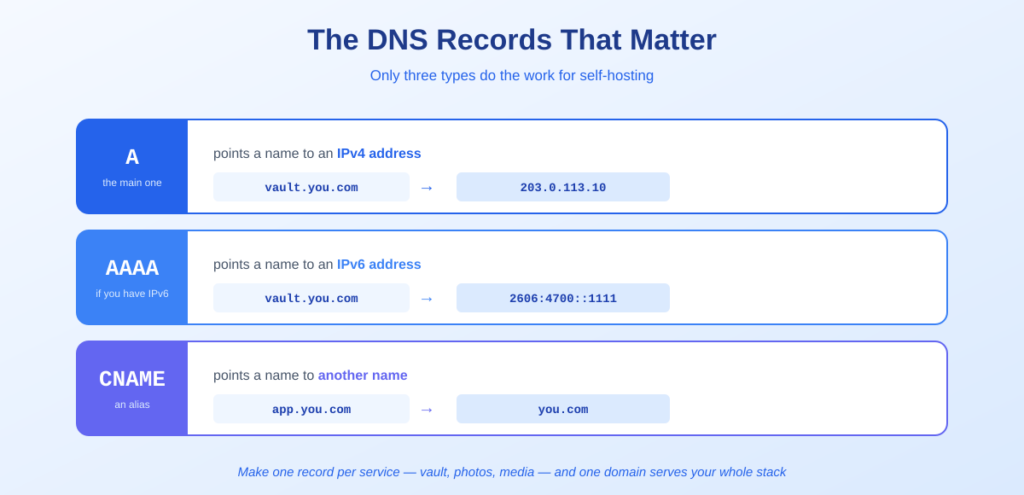
DNS has many record types, but for self-hosting you only need to know a few:
- A record — the main one. Points a name to an IPv4 address. yourdomain.com → 203.0.113.10. This is what connects your domain to your server.
- AAAA record. The same thing for an IPv6 address. Add it if your server has an IPv6 address; harmless to skip if not.
- CNAME record — an alias. Points one name at another name instead of an IP. Handy for pointing app.yourdomain.com at yourdomain.com, so you only update the IP in one place.
- Subdomains. Create a record for each service: vault, photos, media. Each is just an A record (or CNAME) pointing where you want. This is how one domain serves your whole stack.
⏱️ About DNS propagation: When you change your domain’s nameservers (pointing them at Cloudflare, say), it can take up to 24-48 hours to take effect worldwide. But once that’s done, editing an individual record — like updating an A record’s IP — usually propagates in minutes, governed by the record’s TTL (time to live). So the big wait is a one-time setup cost, not something you hit on every change.
Pointing Your Domain: VPS vs Home Server
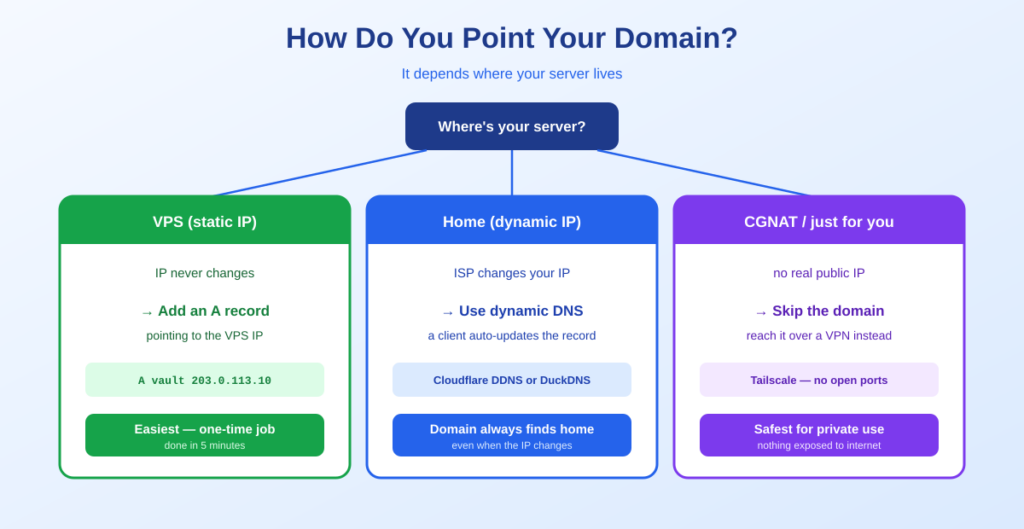
Here’s the fork in the road that trips people up. How you connect your domain depends on where your server lives, because the two have very different IP addresses.
If your server is a VPS (fixed IP) — the easy case
A VPS has a static public IP that never changes. Connecting a domain is a one-time job: create an A record pointing your domain at that IP, wait for it to propagate, and you’re done. This is the simplest path and one reason many people self-host public-facing services on a cheap VPS.
In your DNS provider: add an A record, name @ (or a subdomain like vault), value = your VPS’s IP. Save. That’s it.
A vault 203.0.113.10 (your VPS IP)If your server is at home (changing IP) — use dynamic DNS
A home internet connection almost never has a fixed IP. Your ISP hands out a dynamic IP that changes periodically — so an A record you set today points to the wrong place next week. The solution is dynamic DNS (DDNS): a small client on your server watches your public IP and automatically updates the DNS record whenever it changes, keeping your domain always pointed at home.
- Cloudflare DDNS — the clean option. If your domain uses Cloudflare, a lightweight client (ddclient, or a small Docker container) updates your A record via Cloudflare’s API whenever your IP changes. Free, and everything stays under one domain.
- DuckDNS — the free-subdomain option. DuckDNS gives you a free yourname.duckdns.org subdomain with built-in dynamic updating. Great for getting started without even owning a domain, and widely used for Home Assistant remote access.
⚠️ Two home-server gotchas. First, many ISPs use CGNAT, which means you don’t get a real public IP at all — dynamic DNS can’t help there, and you’ll want a VPN like Tailscale, or Cloudflare Tunnel with Docker if the address has to work for other people, for remote access instead. Second, exposing a home server to the internet means opening ports on your router and taking on real security responsibility. For many people, reaching a home server over a VPN is safer than a public domain — see the note below.
Putting It All Together
Once your domain points at your server, the rest of the self-hosting stack clicks into place:
- Add a reverse proxy. Point your subdomains at a reverse proxy, which routes each one to the right app and gives them all automatic HTTPS.
- Get free SSL. With a domain in place, Let’s Encrypt issues free, auto-renewing certificates — the reason a domain was required in the first place. “Auto-renewing” holds until the DNS record or the port forward moves, which is what a certificate that stops renewing nearly always turns out to be.
- Or skip public exposure entirely. If you only need to reach your services yourself, a VPN like Tailscale gives you secure remote access without a public domain, dynamic DNS, or open ports at all.
Next steps: put your apps behind HTTPS with Nginx Proxy Manager, or skip public exposure with Tailscale. Running on a VPS? See the $5 VPS guide.
Frequently Asked Questions About Domains for Self-Hosting
Do I need a domain name to self-host?
For local-only apps, no — you can use IP addresses on your home network. But you need a domain for two things: proper HTTPS (certificate authorities like Let’s Encrypt issue certificates for domain names, not bare IPs) and memorable, stable addresses. If you want to reach services securely or from outside your home, a domain (or a VPN alternative) becomes important.
How much does a domain for self-hosting cost?
About $10-11 a year for a .com from a good registrar. Cloudflare sells at cost (~$10.44/year with no markup), and Porkbun is a flat ~$11.08 with a friendlier interface. Always check the renewal price, not just the first year — some registrars advertise a cheap first year then raise renewals sharply. WHOIS privacy should be included free.
What DNS record do I need to point a domain at my server?
An A record, which points your domain name to your server’s IPv4 address (for example, vault.yourdomain.com to 203.0.113.10). Add an AAAA record too if your server has an IPv6 address. To point one name at another name rather than an IP, use a CNAME record. For a home server with a changing IP, you’ll update the A record automatically using dynamic DNS.
How do I point a domain at a home server with a changing IP?
Use dynamic DNS (DDNS). Because home internet connections get a dynamic IP that changes periodically, a small client on your server watches your public IP and automatically updates the DNS record whenever it changes. Cloudflare supports this natively via its API, and DuckDNS offers a free subdomain with built-in dynamic updating. This keeps your domain always pointed at home.
How long does DNS take to work?
Changing your domain’s nameservers can take up to 24-48 hours to propagate worldwide, but that’s a one-time setup step. After that, editing an individual record like an A record usually takes effect within minutes, governed by the record’s TTL. So the long wait only happens once, not on every change you make.
Should I buy my domain from the same place I host?
Generally no. Keeping your registrar separate from your web host or server provider makes it much easier to switch hosts later and avoids vendor lock-in. Host-bundled ‘free’ domains can be difficult to transfer away. Buy from a dedicated registrar like Cloudflare or Porkbun and simply point the DNS at whatever server you’re using.
Can I self-host without exposing my server to the internet?
Yes, and it’s often safer. Instead of a public domain, open ports, and dynamic DNS, you can use a VPN like Tailscale to reach your services securely from anywhere. This is especially useful if your ISP uses CGNAT (no real public IP), or if the services are just for you and don’t need to be publicly reachable.
The Bottom Line
🌐 Takeaway: A domain name for self-hosting costs about $10 a year and turns ugly IP-and-port addresses into clean names with real HTTPS. Buy from Cloudflare or Porkbun (check the renewal price, not the promo), then point it at your server with a DNS A record. If it’s a VPS, that’s a one-time job with its static IP. If it’s a home server with a changing IP, use dynamic DNS to keep the record updated automatically — or skip public exposure entirely and reach it over a VPN. Get this right once and every future app gets a clean address and free HTTPS.
Then add HTTPS with a reverse proxy, and explore what to run with 10 self-hosted apps.
How This Guide Was Researched
- 2026 registrar pricing (Cloudflare ~$10.44 at cost, Porkbun ~$11.08 flat, Namecheap cheap year one then higher renewal) verified across multiple current comparisons
- The GoDaddy February 2026 Terms of Service change and resulting loss of recommendations cross-referenced across independent registrar reviews
- DNS record types, nameserver vs record propagation timing, and dynamic DNS mechanics confirmed against Cloudflare’s official documentation
- Dynamic DNS options (Cloudflare API/ddclient, DuckDNS) and the CGNAT caveat drawn from current self-hosting and Cloudflare community guidance
Registrar prices change quarterly — verify at checkout. For DNS specifics, see Cloudflare’s DNS documentation. These providers have no affiliate arrangement here; this guide earns nothing from them.
Questions about your setup? Email hello@selfhostlife.com.
Product links on this site are plain links. We earn nothing from them — see our disclosure policy.